
To communicate with a message queue, two kinds of connections are necessary:
-
A connection to the message broker - specified by URL and user credentials - called connection.
-
A connection to the message queue itself, called session.
To prevent time intensive tasks for opening and closing connections, the opened connections are centralized in a pool. Every opened connection also holds a pool of opened sessions. These both pools can be parameterized in the component diagram.
Connection Pool Parameters
If you step through the component wizard and add an JMS Client to the diagram, you can set the parameters for the connection pool on the Connection Pool tab.
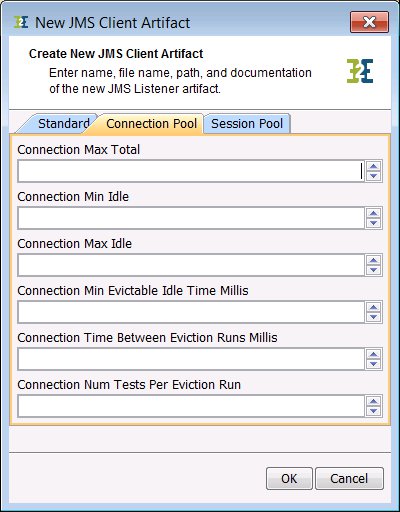
All parameters are optional. no value is entered, a default value will be used as described below.
The parameters in detail:
|
Parameter Name |
Description |
Default Value |
|---|---|---|
|
Connection Max Total |
Maximal number of available connections in the pool. |
-1 (no restrictions) |
|
Connection Min Idle |
Minimal number of open connections that will be hold available. |
0 |
|
Connection Max Idle |
Maximal number of unused open connections in the pool. |
5 |
|
Connection Min Evictable Time Millis |
Minimum idle time of an open connection, before it can be removed from the pool. |
600000 ms |
|
Connection Time Between Eviction Runs Millis |
Time between to test cycles. In a test cycle is checked wether an opened connection is idle for more than Connection Min Evictable Time Millis . -1 means no tests will be called. |
540000 ms |
|
Connection Num Tests Per Eviction Run |
Maximum number of open connections tested on every test run. |
3 |
|
Connection Max Wait Sec |
Maximum time in seconds to wait for an idle connection. Throws an exception if time is exceeded |
300 |
All connection pool parameters can be modified on the Bridge once the service is deployed. Read xUML Service Settings for more information on how to modify xUML service settings.
Session Pool Parameters
If you step through the component wizard and add an JMS Client to the diagram, you can set the parameters for the session pool on the Session Pool tab.
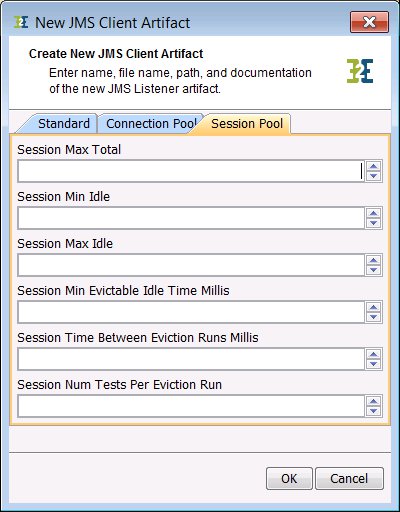
All parameters are optional. If no value is entered, a default value will be used as described below.
The parameters in detail:
|
Parameter Name |
Description |
Default Value |
|---|---|---|
|
Session Max Total |
Maximal number of available sessions in the pool. |
-1 (no restrictions) |
|
Session Min Idle |
Minimal number of open sessions that will be hold available. |
0 |
|
Session Max Idle |
Maximal number of unused open sessions in the pool. |
8 |
|
Session Min Evictable Time Millis |
Minimum idle time of an open session, before it can be removed from the pool. |
1800000 ms |
|
Session Time Between Eviction Runs Millis |
Time between to test cycles. In a test cycle is checked wether an opened connection is idle for more than Session Min Evictable Time Millis. |
-1 (no test) |
|
Session Num Tests Per Eviction Run |
Maximum number of open sessions tested on every test run. |
3 |
|
Session Max Wait Sec |
Maximum time in seconds to wait for an idle session. Throws an exception if time is exceeded |
300 |
All session pool parameters can be modified on the Bridge once the service is deployed. Read xUML Service Settings for more information on how to modify xUML service settings.
JMS Listener Pooling
If you like parallel processing with a listener on a queue, you can specify a pool of listeners. With the listener pool settings, you can configure how many listeners will listen on queue at one time and how many listeners can be added to a queue. As default there is only one listener listening to a queue. For detailed information about the parameters, see the chapter below.
Listener Pool Parameters
If you step through the component wizard and add an JMS Listener to the diagram, you can set the parameters for the listener pool on the Listener Pool tab.
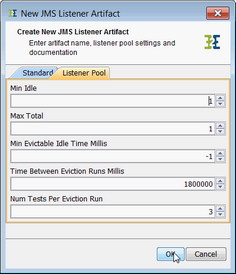
All parameters are optional. no value is entered, a default value will be used as described below.
The parameters in detail:
|
Parameter Name |
Description |
Default Value |
|---|---|---|
|
Min Idle |
Minimal number of open connections that will be hold available. Have to be greater 0. |
1 |
|
Max Total |
Maximal number of listeners that will be connected to the queue. -1 means no restrictions. |
1 |
|
Min Evictable Time Millis |
Minimum idle time of a connected listener, before it can be removed from the pool. |
1800000 ms |
|
Time Between Eviction Runs Millis |
Time between to test cycles. In a test cycle is checked wether an connected listener is idle for more than Min Evictable Time Millis . |
-1 (no test) |
|
Num Tests Per Eviction Run |
Maximum number of connected listeners tested on every test run. |
3 |
All connection pool parameters can be modified on the Bridge once the service is deployed. Read xUML Service Settings for more information on how to modify xUML service settings.