
All methods of JavaMail Library require an instance of MailConnection class as a parameter. This class is used to specify connection details such as name of the mail server, protocol, encryption etc.
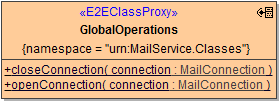
By default, the methods of the JavaMail Library will open a new connection on every call, and close the connection before returning the call. If you intend to call several mail operations in a row, you might want to reuse an established connection. In these cases you can use the two methods of the GlobalOperations class.
Figure: The MailConnection Class
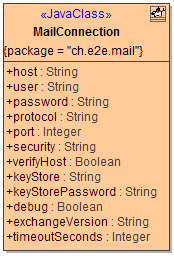
Figure: The GlobalOperations Class
MailConnection
Class MailConnection has the following attributes:
|
Attribute Name |
Description |
Allowed Values |
|
|---|---|---|---|
|
debug |
Specifies whether to write additional debug information to the bridgeserver log. |
true |
Additional debug information is written to the bridgeserver log. |
|
false |
No additional logs (default). |
||
|
exchangeVersion |
Specifies the Microsoft Exchange version. This parameter is mandatory, if protocol is set to exchange, ignored otherwise. |
2007_SP1 |
Exchange 2007 Service Pack 1 |
|
2010 |
Exchange 2010 |
||
|
2010_SP1 |
Exchange 2010 Service Pack 1 |
||
|
2010_SP2 |
Exchange 2010 Service Pack 2 and higher |
||
|
host |
Specifies the host name/IP address of the mail server. |
a valid host name or IP address |
|
|
keyStore |
Specifies the file name of the key store file used for SSL connections (optional). |
a valid filename |
|
|
keyStorePassword |
Specifies the password of the key store (optional). |
a valid password |
|
|
password |
Specifies the user's password. |
a valid password |
Some SMTP servers allow unauthorized sending, in these cases you may leave it as NULL. |
|
port |
Specifies the port of the mail server. |
a valid port number |
|
|
protocol |
Specifies the protocol used for e-mail retrieval and storage.
|
imap |
Use the IMAP protocol. |
|
imaps |
Use IMAP over SSL. |
||
|
pop3 |
Use POP3. |
||
|
smtp |
Use the SMTP protocol. |
||
|
smtps |
Use the SMTPS protocol. |
||
|
exchange |
Use Exchange Web Service (EWS) API. |
||
|
security |
Specifies the encryption protocol.
|
none |
No encryption used. |
|
ssl |
Use SSL encryption. |
||
|
starttls |
Use TLS encryption |
||
|
timeoutSeconds |
Specifies the number of seconds after which a request (send or receive) times out |
any positive integer default is 0, which translates to protocol defaults: infinite timeout for imap(s),pop3,smtp(s), and 100 seconds for exchange |
|
|
user |
Specifies the user account on the mail server. |
a valid user |
|
|
verifyHost |
Specifies whether for SSL connections the mail server host shall be verified or not (optional). |
true |
Verify the mail server (default). |
|
false |
Do not verify the mail server. |
||
GlobalOperations
|
Method Name |
Parameter |
Direction |
Description |
|---|---|---|---|
|
openConnection |
connection |
in |
Establishes a connection with the mail server using the provided connection object.
|
|
closeConnection |
connection |
in |
Closes a connection previously opened by a call to openConnection. |