
Builder 7 The usage of file system access is represented by two aliases: a directory alias (having stereotype <<DirectoryAlias>>) and a file alias (having stereotype <<FileAlias>>). They are connected to the service composite by a dependency.
Figure: File System Component Diagram
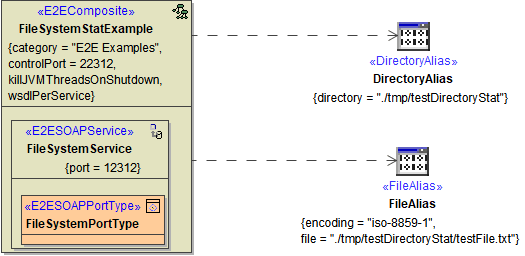
The alias FileAlias represents a certain file, the alias DirectoryAlias represents a certain directory on the file system. On both you can use relative paths - they will be relative to the service directory on the E2E Bridge, then.
The directory alias can define a base directory and a default file encoding:
-
The default file encoding can be overridden per adapter call using a dynamic encoding parameter, e.g. on File System Adapter calls reading lines, or with the Flat File Adapter.
-
Regarding the base directory, the file name parameter will be treated as a path relative to this directory on the File System Adapter call. Jumping out of the base directory by
../../aDirectorytricks is impossible. The base directory can be changed in the service settings on the E2E Bridge, however.
See also Directory Alias and Dynamic File Access for an example of using the directory alias with dynamic file access.
Using a file resource, neither file encoding nor file path can be overridden.
Tagged Values
<<DirectoryAlias>>
| Tagged Value | Description | Allowed Values | |
|---|---|---|---|
| directory | Specify a path to a directory. This directory will be treated as a base directory. It will be either used directly (for a File System Adapter operating directly on directories), or as a base directory for a path segment given by a dynamic file name parameter. It is not possible to jump out of the base directory by ../../aDirectory tricks. The base directory can only be changed in the service settings on the Bridge. |
Example: | ./tmp/testDirectory |
| fileEncoding | Specify the default encoding be used with the directory. This default encoding can be overwritten on adapter calls, using a dynamic encoding parameter, e.g. on File System Adapter calls reading lines, or with the Flat File Adapter. | Refer to Charset Definitions for possible values. | |
| default | iso-8859-1 |
||
<<FileAlias>>
| Tagged Value | Description | Allowed Values | |
|---|---|---|---|
| file | Specify name and path of the file you want to access. | Example: | .tmp/testDirectory/testFile.txt |
| encoding | Specify the encoding of the file. | Refer to Charset Definitions for possible values. | |
| default | iso-8859-1 |
||
| resource |
Instead of a file, you can select a resource from the list of imported resources. The File System Adapter will then use the resource instead of file.
|
|
|
File System Components of Builder Version 6
Deprecated since Builder 7
Click here to read the documentation of the component diagram used in Builder releases before 7 ...
The use of file system access is represented by the two aliases DirectoryAlias and FileAlias. Both have the stereotype <<FileSystemAlias>>. They are connected to the service composite by a dependency.
Figure: File System Component Diagram
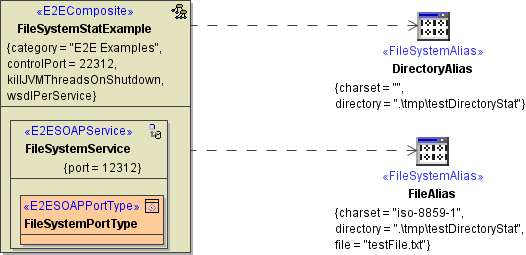
The alias FileAlias represents a certain file. It has three tagged values:
-
fileName: The file name of the file you want to access.
-
directory: The path to the file.
-
charset: The charset definition of the file.
The alias DirectoryAlias represents a certain directory on the file system. Hence, only the tagged value directory has to be defined.
Tagged Values of the <<FileSystemAlias>>
In general, a <<FileSystemAlias>> can have four tagged values:
|
Tagged Value |
Description |
Allowed Values |
|
|---|---|---|---|
|
fileName |
Specify the name of the file you want to access. Leave this tagged value empty, if you want to access a directory. |
Example: |
|
|
directory |
Specify the path to the file or directory. |
Example: |
|
|
charset |
Specify the charset of the file. Refer to Charset Definitions for possible values. If the alias refers to a directory, specifying charset is superfluous. |
default |
|
|
resource |
Instead of a fileName, you can select a resource from the list of imported resources. The File System Adapter will then use the resource instead of directory/fileName.
See Importing File Resourcesfor more information on importing resources and xUML Service Settingsfor more information on changing the settings of a service. |
|
|