|
Model Compiler Menu |
Menu Item |
Hotkey |
Description |
|---|---|---|---|
|
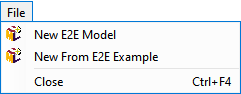
File > New From E2E Example |
|
Creates a new UML model by using the Bridge template, which provides basic components. |
|
File > New E2E Model |
|
Creates a new UML model without any templates. |
|
|
File > Close |
Ctrl+F4 |
Closes the Model Compiler window. |
|
|
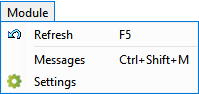
Module > Refresh |
F5 |
Refreshes the deployment view of the Model Compiler. |
|
Module > Messages |
Ctrl+Shift+M |
Opens the Messages window. |
|
|
Module > Settings |
|
Opens the settings dialog of the current Builder project. |
|
|
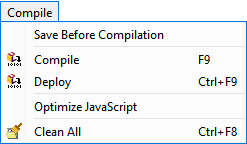
Compile > Save Before Compilation |
|
If the checkbox is selected, the XMI file will be saved first before compiling the xUML service.
|
|
Compile > Compile |
F9 |
Checks the syntax and transforms the UML model to an executable xUML service, whose repository files are stored in a JAR with .jar file extension in the repository directory. |
|
|
Compile > Deploy |
Ctrl+F9 |
Deploys the compiled xUML service to the E2E Bridge node instance that is defined in the UML deployment diagram. |
|
|
Compile > Optimize JavaScript |
|
Check this option to use the Closure Compiler for making JavaScript download and run faster. |
|
|
Compile > Clean All |
Ctrl+F8 |
Deletes the repository files of all local versions of compiled xUML services in the repository directory and all files in the working directory of the current Builder project.
|
|
|
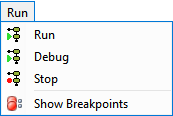
Run > Run |
|
Starts the selected service in the E2E Embedded xUML Runtime. |
|
Run > Debug |
|
Starts the selected service in the E2E xUML Runtime in debug mode. |
|
|
Run > Stop |
|
Stops the selected service. |
|
|
Run > Show Breakpoints |
|
Shows a list with all breakpoints defined on the selected model. |
|
|
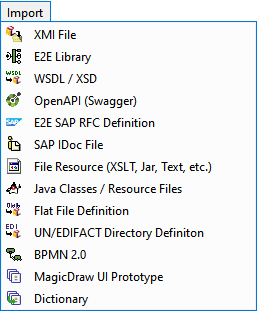
Import > Import XMI File |
|
Imports an XMI file from an arbitrary location into the Builder project. |
|
Import > E2E Library |
|
Imports an E2E Library. |
|
|
Import > WSDL /XSD File |
|
Imports a WSDL or an XSD from a file or URL. |
|
|
Import > OpenAPI (Swagger) |
|
Imports a Swagger OpenAPI definition. |
|
|
Import > E2E SAP RFC Definition |
|
Imports an SAP RFC definition that has been generated on an SAP system. |
|
|
Import > SAP IDoc File |
|
Imports an SAP IDoc file and creates the corresponding classes. |
|
|
Import > File Resource |
|
Imports a file resource. |
|
|
Import > Java Classes / Resource Files |
|
Imports Java classes and properties resource files. |
|
|
Import > Flat File Definition |
|
Imports flat file definitions to process flat files. |
|
|
Import > UN/EDIFACT Directory Definition |
|
Imports an EDIFACT schema you can select from a list. |
|
|
Import > BPMN 2.0 |
|
Imports a BPMN 2.0 definition. |
|
|
Import > MagicDraw UI Prototype |
|
Imports a MagicDraw UI prototype. |
|
|
Import > Dictionary |
|
Imports a UI translation file. |
|
|
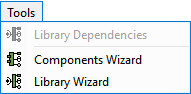
Tools > Library Dependencies |
|
Starts the E2E Library Dependencies viewer. This menu item is available only if the current model has imported libraries. |
|
Tools > Components Wizard |
|
Starts the E2E Components Wizard . This menu item is available only if the current model has no component diagram yet. |
|
|
Tools > Library Wizard |
|
Starts the E2E Library Wizard . This menu item is available only if the current model has no library diagram yet. |
