
The generated root state machine of Designer service comes with an integrated error handling.
All errors that occur on process execution are caught.
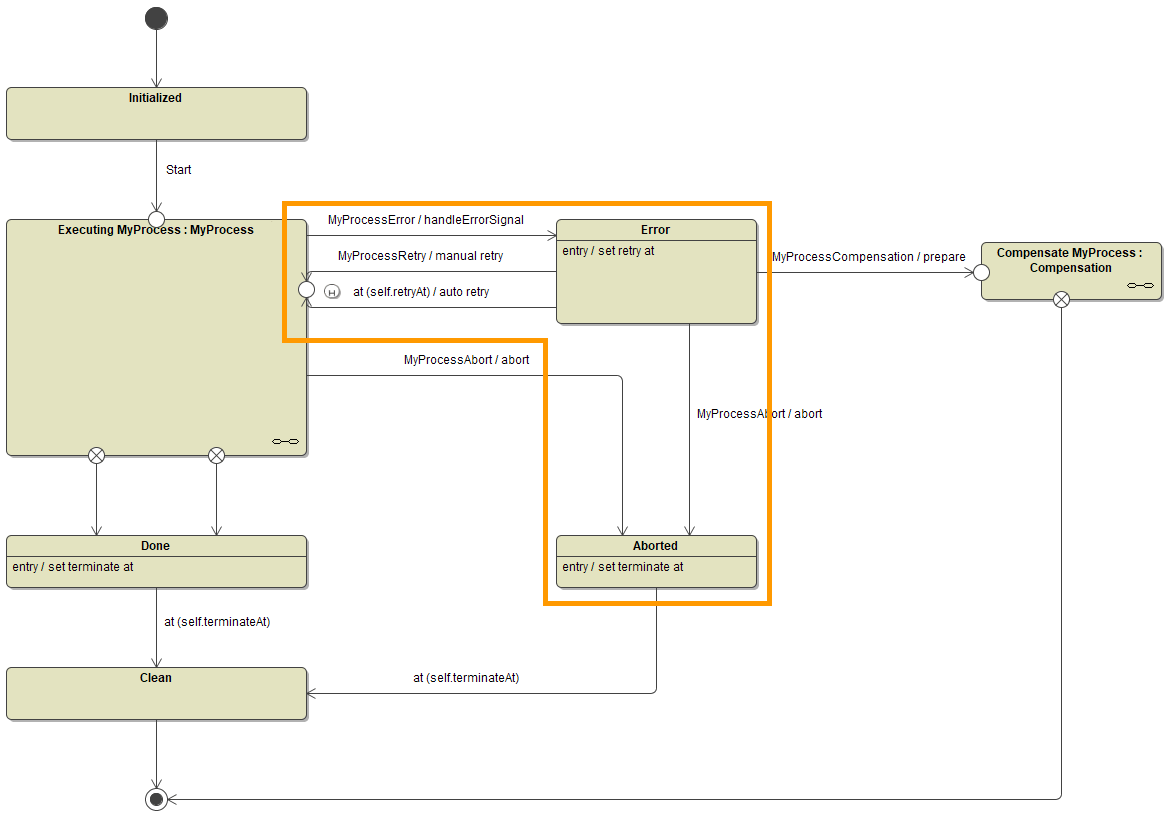
Executable processes work with the concept of transactions. Transactions are equivalent to units of work, that are committed at the end of the session. In case an error occurs during a transaction, the following happens:
-
The error is caught.
When an exception occurs and is not explicitly caught in the execution diagram by the modeler, the current implementation (and persistent state transaction) skips to its end. All subsequent code is skipped. Then, the error is caught by the persistent state engine. -
The error handler is invoked.
The error handler sends an error signal (handleErrorSignal) to the root state machine. -
The process switches into the error state at transaction end.
The persistent state engine commits the transaction - and also the error signal. The process switches to the next process step but then goes to the error state.
The process instance is displayed as erroneous. You can now
-
Rectify the error and send a retry signal
You can now look into the error and apply fixes if necessary. The last process step the process has reached is marked by a history state, so it is possible to trigger a retry from this very step. You can either trigger a manual retry, or the process could have auto retry enabled and automatically performs retries in given intervals. -
Abort the process instance
Alternatively, you can abort the process instance by sending an abort signal. In this case, the process instance will be terminated as aborted (not done).
There is one exception to the rules mentioned above: If an error occurs in the On Exit execution of a User Task, the process state machine goes into the error state but the execution still continues to the next state. You have the possibility to perform a retry, but this retry will not perform any actions from the On Exit execution that may have caused the error. This must be implemented manually as described below.
Behavior of the State Machine
The behavior of the process is implemented to a sub state machine (MyProcess in the state machine diagram above). Depending on the BPMN element you have added your execution implementation to, this process state machine shows a different behavior.
|
Error In |
State Machine Element |
BPMN Element |
Behavior on Error |
|---|---|---|---|
|
On Event |
Transition from state Initialized to start event of sub state machine |
|
|
|
Transition from previous state to current state |
|
||
|
On Exit |
Entry of Executed <name of service task> |
Service Task |
|
|
Entry of Executed <name of user task> |
User Task |
|
|
|
Get Data |
|
User Task |
|
|
Decision |
Guard expression on state transition <name of the decision flow> |
Exclusive Gateway |
|
Behavior on Retry
In case of error, when the process is in error state, you can trigger a retry of the process execution. Depending on your setup, refer to the following documentation pages for more details on how to do this:
-
Kubernetes: Persistent States of Containerized xUML Services
-
Integration: Stalled Persistent State Objects > Triggering a Retry
When implementing your process, you should pay attention to the particularities listed below to allow for a smooth retry behavior.
Persisted Variables
A retry resumes the process starting with the behavior the error has occurred in. All persisted variables of the process are saved to the error state, and the retry will be performed with the saved values.
Expert Advice
Either set the persisted variables to valid starting values at the beginning of each behavior to avoid data corruption.
Or keep track of the processing to be able to not start from the beginning but from the exact point where the error occurred.
Please also consider the hint regarding persisted variables at Order of Execution in Execution Diagram below.
Example
Processed data items are saved to a persisted array anArray. As the process switches into error state, all values within anArray are saved. On retry, the processing of data items is restarted from the beginning. If you do not initialize the array properly, you may end up with duplicate array elements when data items are processed for the second time. In this case, it would be advised to initialize the array like e.g. set anArray = NULL.
Order of Execution in Execution Diagram
In this context, the order of execution in the execution diagram is important. The implementations in the execution diagram are executed in the following order:
-
Persisted to Local
At first, all object flows from persisted variables to local variables are executed. -
Operation Calls
Next, all operation calls are performed in the defined order - including assigning the respective output values to local and persisted variables. -
Local to Persisted
Finally, all object flows from local to persisted variables are executed.
Regarding the retry hints concerning Persisted Variables above, please note that persisted variables are updated
-
from operation calls directly after that call
-
from local variables at the very end of the execution
Backend Processing
The same behavior as explained for persisted variables (see above) also applies to backend processing: If your backend does not support transaction handling, you should keep track of your processing to avoid duplicated processing in case of retry. This e.g. may concern file uploads or API calls.
For non-transactional backend processing, keep track of the processing to be able to retry the process from the exact point where the error occurred. You can save this data to persisted variables as these are saved to the error state and are available on retry.
Error Handling for User Tasks/On Exit
If an error occurs in the On Exit execution of a User Task, the process state machine goes into the error state but the execution still continues to the next state.
You have the possibility to perform a retry, but this retry will not perform any actions from the On Exit execution that may have caused the error.
This is especially relevant if you perform actions in the On Exit execution that can fail, like e.g. a backend call. In this case we recommend to not model such actions in the user task, but to add them to a service task that directly follows the user task. For service tasks, retry works out of the box as described above.
If you need to perform actions in the On Exit of a user task that can lead to errors, you need to
-
model the critical actions in an activity diagram,
-
catch all errors in the activity diagram,
-
set an error flag,
-
model a decision node right after the user task to go back to the user task if an error occurred.
In this case, the user form will be displayed once again, and the user can e.g. rectify their input.
Related Content
Related Pages: