As soon as the preconditions on Java side are met, you need to do the following things within your xUML service model to implement the Java callback:
-
Import the prepared JAR file into an xUML service as described on Importing Java™ Classes and Properties Resource Files in the E2E Builder User's Guide.
-
Define an <<E2EJavaPort>> implementing the offered callback interface (see xUML Service Model for Java Callback | id (25.1)xUMLServiceModelforJavaCallback ImplementingtheCallback further below).
-
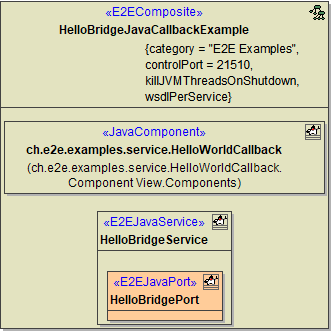
Add a component diagram with a <<JavaComponent>> and an <<E2EJavaService>> (see xUML Service Model for Java Callback | id (25.1)xUMLServiceModelforJavaCallback JavaCallbackComponents further below).
Implementing the Callback
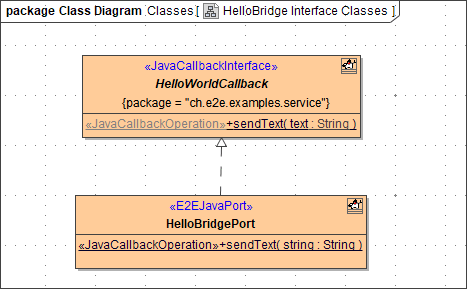
The Java callback needs to be implemented by an <<E2EJavaPort>> on Bridge side.
|
|
In the example, you can find a class HelloBridgePort with stereotype <<E2EJavaPort>> that implements the callback by a sendText operation. This implementing class needs to be linked to the <<JavaCallbackInterface>> by an Interface Relalization relation. The implementing operation sendText itself needs to have stereotype <<JavaCallbackOperation>>. |
|
|
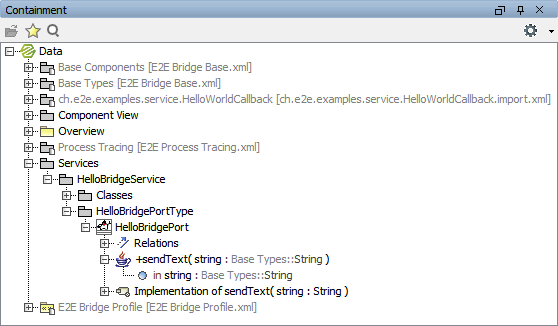
In the containment tree, you can see the port type and the operation. |
|
|
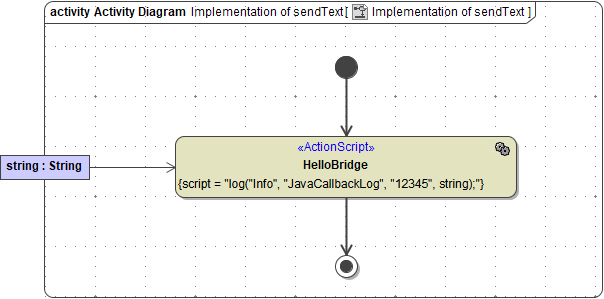
Operation sendText is implemented by an activity diagram, which uses parameter string to write a log entry. |
Java Callback Components
Having defined the implementation, you can already start building the component diagram using the wizard.
Figure: Java Callback Components