
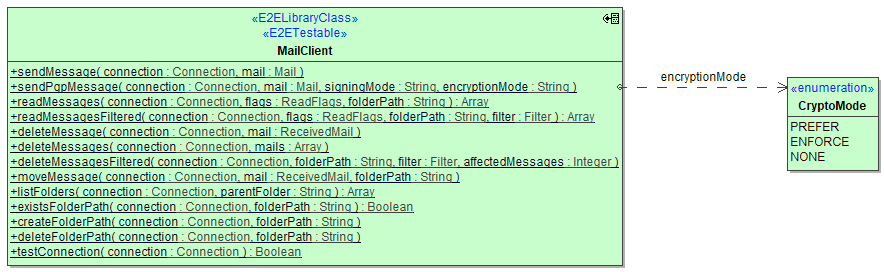
Sending messages requires you to assemble an instance of Mail and feeding it to the sendMessage() operation.
Operations
sendMessage
| Parameter | Types | Direction | Description |
|---|---|---|---|
| connection | (25.1) JavaMail Library Reference#Connection | in | Specify the Connection object defining the mail server connection parameters to use (see Mail Server Connection). |
| in | Prepare a mail object to send. |
sendPgpMessage
Requires IPgpKeyProvider Implementation
For PGP encryption to work, be sure to register your implementation of IPgpKeyProvider (see Keys and Certificates).
| Parameter | Types | Direction | Description | Allowed Values / Example | |
|---|---|---|---|---|---|
| connection | (25.1) JavaMail Library Reference#Connection | in | Specify the Connection object defining the mail server connection parameters to use (see Mail Server Connection). |
|
|
| in | Prepare a mail object to send. |
|
|
||
| encryptionMode
|
String |
in | Specify one of the encryption modes. |
PREFER |
Apply encryption when PGP keys can be retrieved (see Keys and Certificates), otherwise do not apply any encryption. |
|
ENFORCE |
Apply encryption when PGP keys can be retrieved, otherwise throw an exception. |
||||
|
NONE |
Do not apply any encryption (default, same behavior as sendMessage()). |
||||
Types
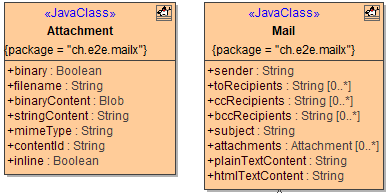
Mail
| Attribute Name | Type | Description |
|---|---|---|
| sender | String |
Provide the email address of the sender. |
| toRecipients | Array of String | Provide an array of TO recipient's email addresses. |
| ccRecipients | Array of String | Provide an array of CC recipient's email addresses. |
| bccRecipients | Array of String | Provide an array of BCC recipient's email addresses. |
| subject | String | Provide the email subject. |
| attachments | Array of (25.1) JavaMail Library Reference#Attachment | Provide an array of email attachments. |
| plainTextContent | String |
Provide a plain text message if applicable. |
| htmlTextContent | String |
Provide an HTML message if applicable. |
Attachment
Adding inline images to HTML emails is an art form. Be prepared to see different results depending on the client application receiving your message. Make sure to test your HTML code thoroughly to get good results.
Also, sending large images inline is considered bad style as it blows up message size considerably and could be replaced with links to online locations of the image (e.g. a CDN or publicly accessible web server).
| Attribute Name | Type | Description | Possible Values | |
|---|---|---|---|---|
| binary | Boolean | Indicates whether binaryContent or stringContent is used. | true | Attachment contents canl be found in, or shall be taken from, binaryContent. |
| false | Attachment contents can/shall be found in, or shall be taken from, stringContent. | |||
| filename | String | The filename of the attachment. |
|
|
| binaryContent | Blob |
Contains the binary content. |
any Blob |
|
| stringContent | String |
Contains the non-binary content. |
any String
|
|
| mimeType | String | Contains the mime type (content type) of the attachment. |
any valid MIME content-type, e.g. mimeType is unreliable upon receiving emails, i.e. can be NULL. Especially when reading from Exchange servers using exchange or office365 connections. |
|
| contentId | String | The content id of the attachment, a unique id across all attachments of the same message. | When set to e.g. myUniqueId, you can refer to this attachment from HTML message content like <img src="cid:myUniqueId"> |
|
| inline | Boolean | Controls whether the attachment is flagged with the corresponding content disposition tag. | true | Attachment is flagged, and will be displayed inline within a HTML message. |
| false | Attachment is not flagged. | |||