To write log messages to the standard log of the xUML service using a custom logger configuration, use the logTo() function. It provides the same functionality as the Log Adapter.
To use the standard logger configuration, use the log() Operation.
|
Syntax |
|
|
|---|---|---|
|
Semantics |
Write a message to the standard log of the xUML service using a custom logger configuration. Valid log levels are: Fatal, Error, Warning, Info, and Debug as described in the log level guidelines on Bridge Server Log Levels of an xUML Service. |
|
|
Substitutables |
|
Log channel the message will be logged to. See Defining a Custom Logger Configuration for more information. |
|
|
String literals Fatal, Error, Warning, Info, or Debug. |
|
|
|
String literal, usually containing the error description. |
|
|
|
(Optional) Object of complex type (class or array) that contains additional details. The contents of this object will be flattened and appended to the description. |
|
|
Examples |
Custom Logger Configuration: 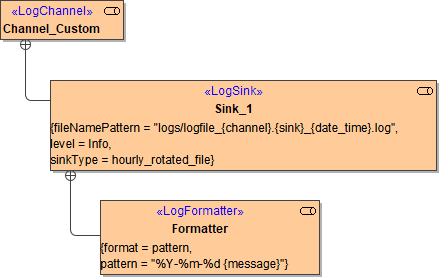
Error Detail Object: Log Statement: Content of the Log File According to Defined Formatter (Class): 2020-06-25 Stock_Synchronization/SYNC001: Item ID could not be found. Detail: e2e:type='ErrorDetail', element='AF-1201', value='Adapter' Content of the Log File (Array): ... Detail: e2e:type='ErrorDetail', [0].element='AF-1201', [0].value='Adapter', [1].element='CD-2000', [1].value='Connector' |
|
|
|
<your example path>\E2E Action Language\Operating\uml\logger_channels.xml |