
This page explains the Flat File Adapter in Bridge context. If you were looking for the same information regarding the PAS Designer, refer to Flat File Adapter in the Designer guide.
To split flat file record fields, you can also use regex patterns. However, you need deeper knowledge of regex patterns to use this approach.
|
|
<your example path>\Add-ons\FlatFile\uml\flatFilePattern.xml |

Look at the example flat file below. It contains a list of URLs.
Figure: Flat File With URLs

By specifying an Attribute Pattern on the flat file record, you can split the records e.g. into
-
protocol
-
delimiter
-
host
-
port
-
path
Figure: Class Diagram of a Flat File Using Pattern
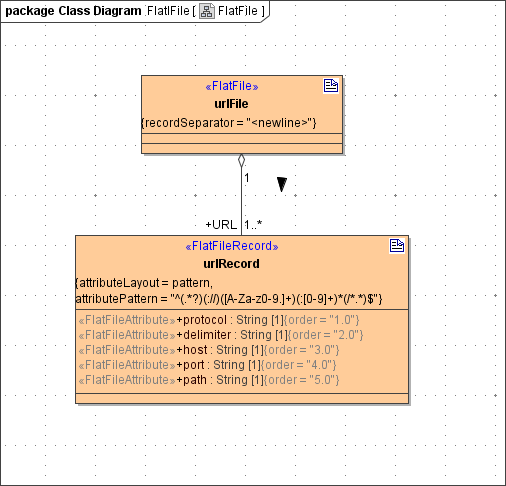
The pattern to split the record with is:
^(.*?)(://)([A-Za-z0-9.]+)(:[0-9]+)*(/*.*)$
Each group delimited with brackets represents an record field (class attribute).