
Together with the REST Service features, you can use the normal security interceptor features as described on Security Model pp.
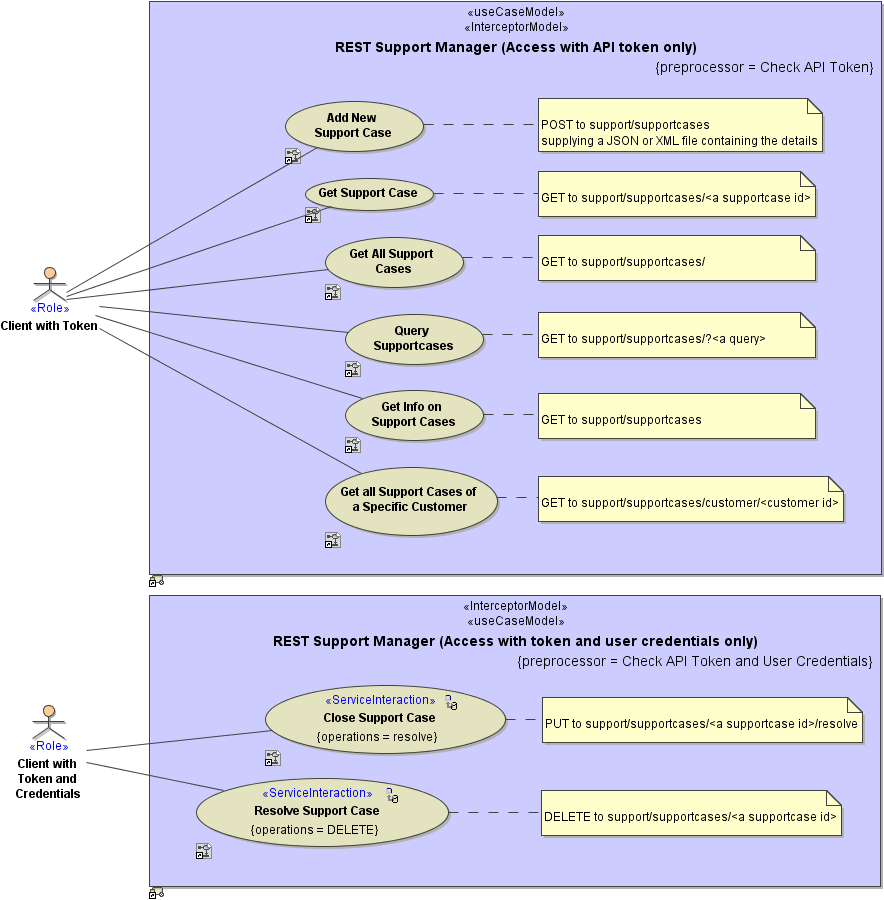
The authentication headers can be accessed via the Bridge REST Test Tool, to e.g. set them for testing purposes.
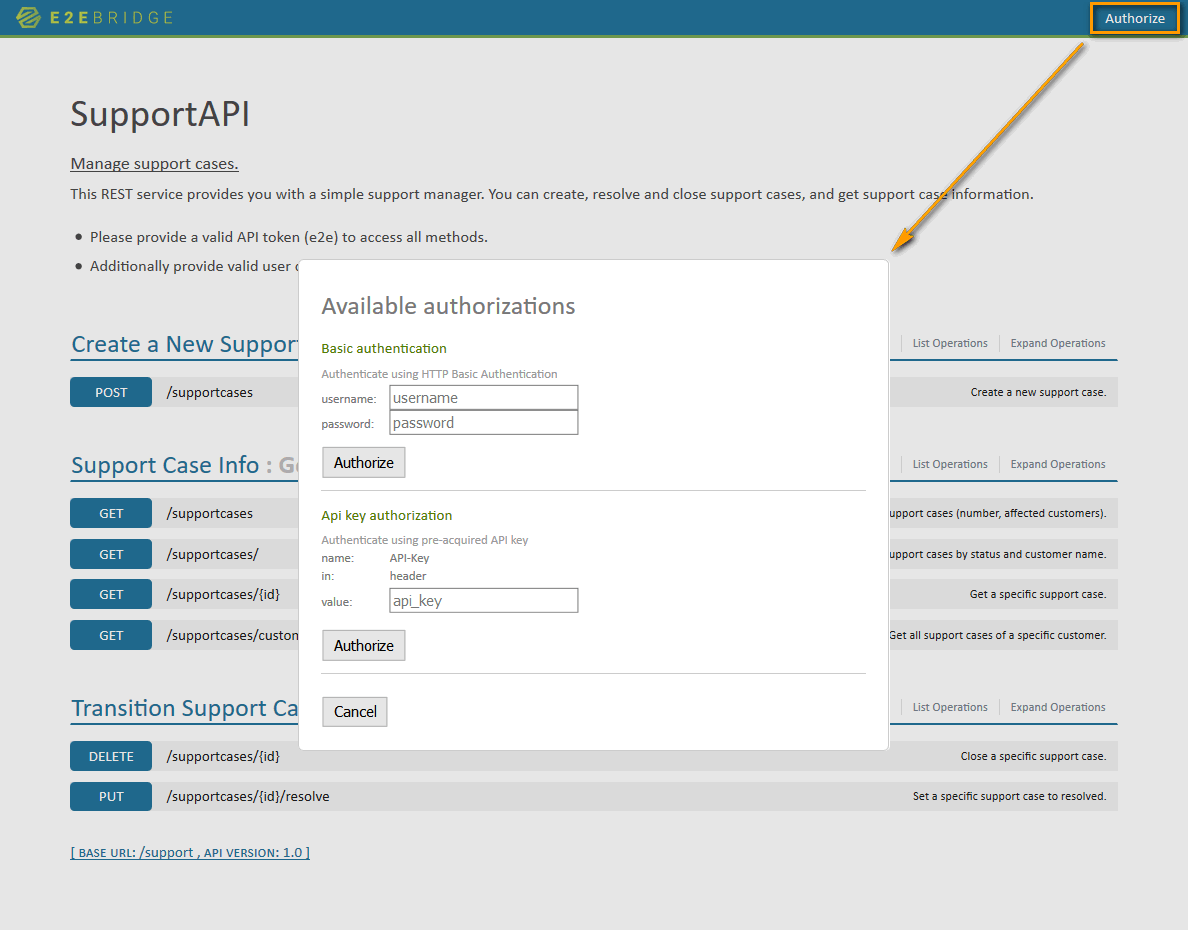
Click Authorize in the top right corner to enter the credentials.
Enabling Authentication
If you want to use authentication with a REST service, set the tags tokenType, tokenHeaderName, and useBasicAuth on the REST service component in the component diagram.
| Tagged Value | Description | Allowed Values | ||
|---|---|---|---|---|
|
Port
|
Defines the machine port number the service is binding to. This port number can be given at service level only. | any number
Using ports below 1024 may require additional privileges. |
||
| Trace Port
(tracePort) |
Defines the shadow port of the service used for tracing. | any number (default is service port + 40000) | ||
| Max Request Body Size
(maxRequestBodySize) |
Runtime 2021.2 Specifies the maximum size of the request in KB (1 KB = 1024 Bytes). This can be used to prevent DoS or similar attacks. When the payload of the service exceeds the given maximum, incoming request are rejected. |
any positive integer | ||
| 0 |
Accept unlimited requests (default of services compiled with Builder versions < 7.12.0). |
|||
| 2048 | Builder 7.12.0 2MB, default if not specified | |||
| Max Request Header Size
(maxRequestHeaderSize) |
Runtime 2022.6 Specifies the maximum size of the request header in KB (1 KB = 1024 Bytes). This can be used to prevent DoS or similar attacks. When the header payload of the service exceeds the given maximum, incoming request are rejected. Compatibility Hint For older Runtimes, a limit of 8 KB applies. |
any positive integer | ||
| 8 | 8 KB (default if not specified). | |||
| Http Header Roles
(httpHeaderRoles) |
Runtime 2020.12 Builder 7.12.0 Assign roles to dedicated incoming headers that define how the related header will be treated by the xUML Runtime. These definitions overwrite the default behavior (see REST Adapter > HTTP Headers), and X-Transaction-Id, X-Request-Id, X-Sender-Host and/or X-Sender-Service will be substituted by this definition. Refer to HTTP Header Support > Overwriting the Standard HTTP Headers for more details. Http Header Roles can hold a list of definitions in format |
client_host |
Take the sender host from header <http header name> instead of X-Sender-Host. |
|
|
client_service |
Take the sender service from header <http header name> instead of X-Sender-Service. |
|||
|
correlation_id |
Take the correlation ID from header <http header name> instead of X-Request-Id. |
|||
|
transaction_id |
Take the transaction ID from header <http header name> instead of X-Transaction-Id. |
|||
| Token Type
(tokenType) |
Mark the service as to use token authorization. The Bridge REST Test Tool will then present a field to enter the token and put the value into the HTTP headers. Refer also to tokenHeaderName for more information. You can use both in a REST service: basic authorization and token authorization, see useBasicAuth. |
none | Do not use token authorization. | |
| API Key | Use API key authorization. | |||
| Token Header Name
(tokenHeaderName) |
Defines the name of the header that will transport the token. This tagged value is only relevant, if token authorization is enabled at all. The token header name will be presented as the name of the header field that can be entered in the Bridge REST Test Tool. Refer also to tokenType for more information. | A valid HTTP header name (according to RFC2616/RFC7230). | ||
| Use Basic Auth
(useBasicAuth) |
Mark the service as to use basic authentication mechanisms. The Bridge REST Test Tool will then present fields to enter the credentials and put the values into the HTTP headers. You can use both in a REST service: basic authorization and token authorization, see tokeType and tokenHeaderName. |
true | Enable basic authentication. | |
| false | Disable basic authentication (default). | |||
| Json Keep Nulls
(jsonKeepNulls) |
When jsonKeepNulls is true, attributes of the REST response object having NULL values will be rendered to the REST response, otherwise they will be left out completely (see also chapter NULL Values). |
true | Render attributes with NULL values to the REST response. | |
| false | Leave out attributes with NULL values in the REST response (default). | |||
| Json Compact
(jsonCompact) |
When jsonCompact is true, the JSON composer will generate compact JSON, otherwise it will generate pretty JSON. jsonCompact defaults to true - also on re-compile of an older model with Builder as of 7.0.0-beta3. |
true | Generate compact JSON (default). | |
| false | Generate pretty JSON. | |||
| Json Write Type Discriminator
(jsonWriteTypeDiscriminator) |
Runtime 2021.6 Builder 7.15.0 When jsonCompact is true, the JSON composer will generate xUML type properties ("e2e:type") to the generated JSON. If this option is true, the Runtime will write the original xUML type to the generated JSON in form of Runtime versions before 2021.6 will ignore the value. |
true | Write xUML type discriminator. | |
| false | Do not write xUML type discriminator. | |||
Setting these tagged values does not implement anything yet. The authorization headers have to be inspected in a security interceptor preprocessor to implement authentication and authorization.
Implementing Authentication
In the preprocessor of you security interceptor, you can implement the authentication process.
-
Read the authentication headers (see REST Service Authentication | id (25.1)RESTServiceAuthentication ReadingtheRESTHTTPHeaders further below), which areAuthorization for basic authenticationThe basic authentication headers are base64 encoded. You have to decode them before usage.<name of token header> in component diagram for token authentication
-
Decode the basic authentication if necessary (see REST Service Authentication | id (25.1)RESTServiceAuthentication DecodingBasicAuthentication further below).
-
Implement your security settings depending on the header values.
In case of the REST Support Manager example, this is a very simplified role assignment based on hard coded header values.
Reading the REST HTTP Headers
To read the REST HTTP headers, use getRestHttpRequest().
Figure: getRestHttpRequest()
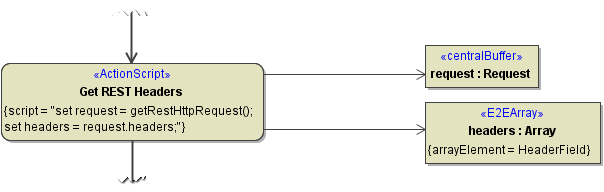
Receive the result in an object of type Request and get all request headers in an array object of type HeaderField.
HeaderField is a type containing a key value pair (see Request and Response Types).
Getting the API Key from the Request Headers
To get the API key value pair from the request headers array, look for the API key name you defined in the component diagram. In our example, this is "API-Key".
Figure: Lookup API Key
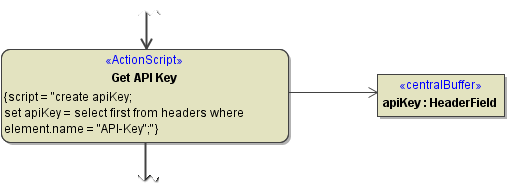
Getting the Authorization Headers from the Request Headers
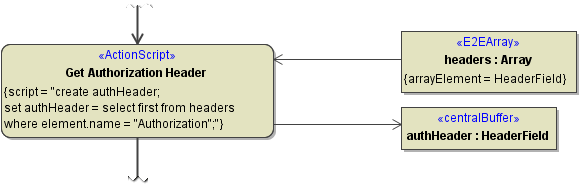
To get the Authorization key value pair from the request headers array, look for "Authorization".
Figure: Lookup Authorization Header
Decoding Basic Authentication
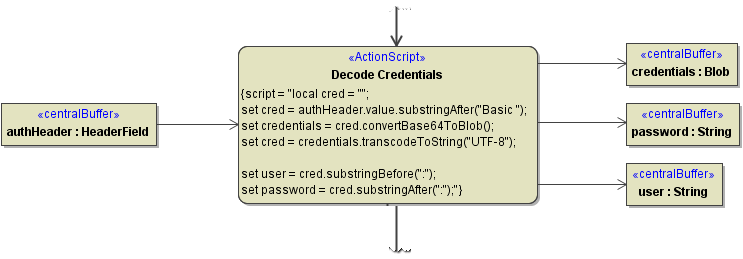
To decode the base64 encoded basic authentication header value, use operations convertBase64ToBlob() and transcodeToString().
-
Remove string "Basic " from the beginning of the header value, e.g.
local cred = "";
set cred = authHeader.value.substringAfter("Basic ");
-
Convert the base64 string to a Blob object using
convertBase64ToBlob(), e.g.set credentials = cred.convertBase64ToBlob();
-
Convert the Blob object to a readable string using
transcodeToString(), e.g.set cred = credentials.transcodeToString("UTF-8");
-
Split user and password from the credentials string, e.g.
set user     = cred.substringBefore(":");
set password = cred.substringAfter(":");