
The main menu Builder is situated in the menu bar of MagicDraw. The window of the Model Compiler has a menu bar of its own (see Menu Overview of the xUML Model Compiler).
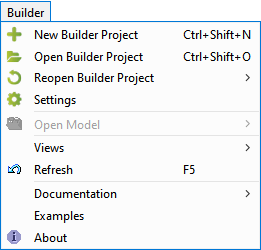
|
Menu Item |
Hotkey |
Description |
|---|---|---|
|
New Builder Project |
Ctrl-Shift-N |
Opens a dialog window to create a new Builder project. |
|
Open Builder Project |
Ctrl-Shift-O |
Opens a file chooser dialog to select an existing Builder project. |
|
Reopen Builder Project |
|
Show a list of recently opened Builder projects to select from. |
|
Settings |
|
Opens the settings dialog of the current Builder project. |
|
Open Model |
|
Shows a list of all models of the open Builder project to select from. |
|
Views > Messages |
Ctrl-Shift-M |
Hides or shows the E2E Messages window. |
|
Views > Model Compiler |
|
Hides or shows the E2E Model Compiler window. |
|
Refresh |
F5 |
Updates all views in the floating windows that have been opened. In the Model Compiler, all descriptors in the XMI files are refreshed depending on updated information in the UML diagrams. |
|
Documentation |
|
Shows helpful documentation links: to the Scheer PAS Documentation Home, the Reference Guide and the development tutorials. |
|
Examples |
|
Shows a dialog to install the xUML service Examples. |
|
About |
|
Shows version and release date of the Builder. |