
Selects array items by evaluating a boolean where-expression for each array element and optionally grouping it.
|
Syntax |
|
|
|---|---|---|
|
Semantics |
Selects array items by evaluating a boolean
Please note that Refer to Object References > Arrays for more general details on references and their impact, and an example. To create an independent target array, use the copy() Operation. |
|
|
Substitutables |
|
Can be any variable or object attribute having the type Array. |
|
|
This is can be any expression evaluating to Boolean and containing the keyword |
|
|
|
This is can be any expression containing the keyword The resulting (grouped) array is an array of type Group, where values contains the array elements that belong into that group. 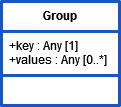
The group-by clause ( |
|
|
|
This is can be any expression containing the keyword The distinct-clause ( |
|
|
|
The examples below use an array of Company objects as input: |
|
|
Examples |
Select against a specific property from a complex array Input: an array of articles JSON
|
|
|
Select distinct values Input: an array of articles JSON
|
||
|
Grouping Example Input: an array of articles JSON
Select all articles grouped by category: Result: JSON
|
||
ActionScript_ArrayOperations_Example
Click here to download a simple example model that shows how to use Action Script to handle arrays with Scheer PAS Designer.
Related Content
Related Pages:
-
(25.2) apply Statement
Applies an Action Script operation or custom class operation to each element of an array. -
(25.2) Get Array Element Operator []
Returns an array element. -
(25.2) reduce Statement
Reduces an array to a scalar value by recursively applying an expression to each array element and its next element. -
(25.2) select Statement
Selects array items by evaluating a boolean where-expression for each array element and optionally grouping it. -
(25.2) sort Statement
Sort an array by using an expression to compare array elements with each other. -
Object References
The Designer uses references for all objects. This page explains the concept and implications of object references.