
|
Syntax |
|
|
|---|---|---|
|
Semantics |
The macro works like mapEqualNames() Macro if the mapped source attribute exists. If it doesn't exist, the mapping is skipped for this attribute. This way existing target attributes are not overwritten by NULL values of source attributes. You can supply multiple input objects. Only the existence of the attribute values is checked. It is assumed that the input object exists. This macro does not work recursively and thus do not perform a deep copy of attributes of complex types. |
|
|
Substitutables |
|
Can be any complex object having attributes of any type. |
|
Examples |
|
|
Usage of mapEqualNames()
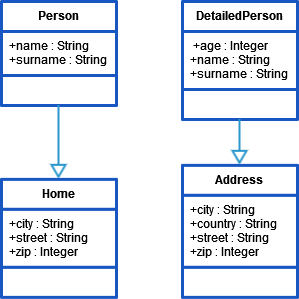
Given are the two unrelated classes Person and DetailedPerson.
|
Data / Script |
Description / Result |
|---|---|
|
JSON
|
The object personIn is of type DetailedPerson. |
|
This statement assigns values to the matching attributes of object personOut which is of type Person : JSON
age and country remain unset. |
Usage of "mapEqualNamesIfExists()"
|
Data / Script |
Description / Result |
|---|---|
|
JSON
|
The object personIn1of type Person already contains values.
|
|
JSON
|
The object personIn2 is of type DetailedPerson.
|
|
This statement assigns values from personIn2 to the matching attributes of personIn1: JSON
The properties of personIn1 get overwritten with existing values. The value of street remains unchanged, because it did not exist in the source object personIn2 (was NULL). |
Usage of mapEqualNames() with the "append" Statement
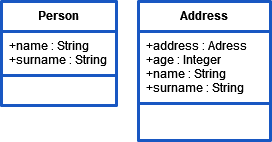
You can use mapEqualNames() along with the append Statement to add a complex object with numerous attributes to an array of unrelated objects which needs only some of the information. The mapEqualNames()macro will create set statements for all equal named attributes found in the target object while the append statement will add the result to an array.
Given are the two unrelated classes Person and DetailedPerson.
|
Data / Script |
Description / Result |
|---|---|
|
JSON
|
Assume that aDetailedPerson is provided from an external source. For further processing, we are interested in name and surname only. |
|
Result array: JSON
|
Related Content
Related Pages: