
Data Mapping is a very common task in the integration business. Usually, this is handled in activity diagrams by using set statements, decisions, operations and sub-activities. This often leads to a huge modeling and scripting effort.
Scheer PAS Designer comes with a Mapping Editor that offers a more convenient alternative. Define attribute mappings directly in a mapping diagram by drawing relations between the attributes of the involved classes.
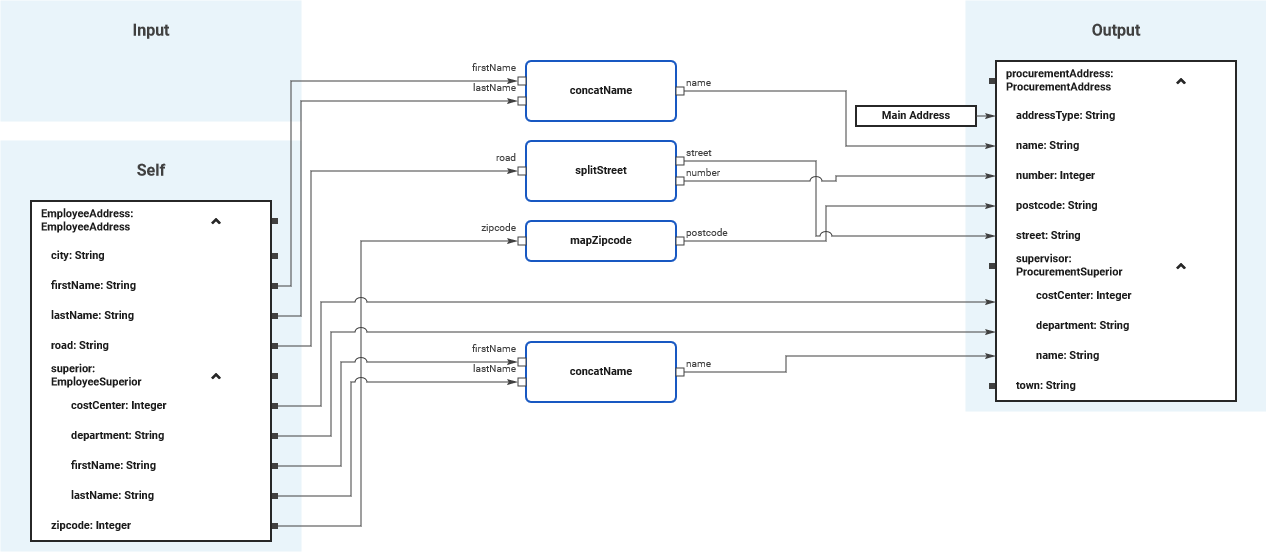
This section explains common mapping tasks and how to perform them with the Mapping Editor.
-
Refer to Supported Mapping Functions for an overview on all supported mapping functions.
-
Refer to Modeling Data Mapping for more information on how to work with the Mapping Editor.
DataMapping_Simple_Example
Click here to download a simple example model that shows how to implement simple mappings in Scheer PAS Designer.
ArrayMapping_Simple_Example
Click here to download a simple example model that shows how to implement array mappings in Scheer PAS Designer.