
When composing a flat file with the Flat File adapter, you can automatically enclose strings in quotes by using the quoteCharacter attribute.
While parsing a flat file, the parser will ignore the quote character when reading the field value.
FlatFileAdapter_Quotes_Example
Click here to download a simple example model that shows the usage of a quote character with the Flat File adapter in Scheer PAS Designer.
Have a look at the example flat file structure below. It represents a flat file with a header line and three columns, each of them referring to an attribute of Customer.
The customer name and ID are stored as strings.
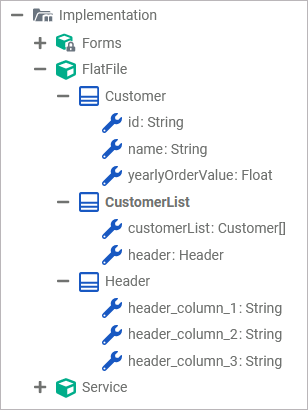
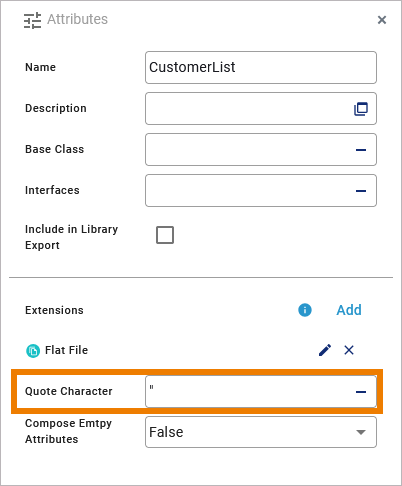
To enclose all string values in the file with double quotation marks, the character " is specified as the extension attribute quoteCharacter on class CustomerList.
Below you can see an example for a composed flat file for this structure.
"name","id","order value per year"
"Oliver Twist","4711",4000.5
"Rose Bloom","1234",10000
"Adam Sun","2341",626.49
"Liv Falls","3412",1030.9
"John Snow","4123",2300
Related Content
Related Pages:
Other Common Flat File Issues: