
If the state machine stops in a state that can be left only by receiving a completion signal, the state machine stalls. Stalled objects can happen, if e.g.
-
the xUML Runtime aborts the persistent state transition due to a license violation and the objects are stuck in a state.
-
an error occurs that leads to a completion transition being rolled back and you have no error handler defined.
-
the error handler himself throws an error.
Stalled objects are displayed in red in the persistent state objects table:
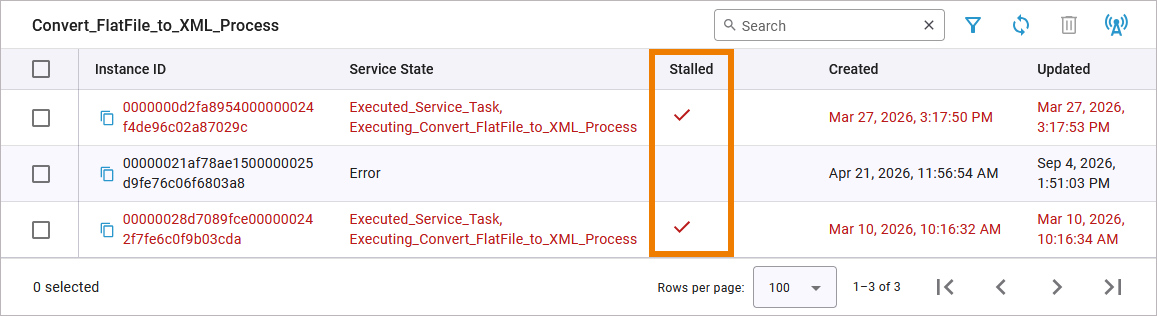
You can treat stalled persistent state objects in two ways:
Deleting Stalled Persistent State Objects
You can delete stalled persistent state objects just as any other persistent state objects. Refer to Deleting Persistent State Objects for detailed information on how to do this.
You must be aware that deleting these objects may affect the process instance, and some process steps might not have been completed. You will need to manually verify that all processing has been carried out correctly.
Triggering a Retry
You can retry a stalled persistent state object. Retrying will trigger a completion signal being sent to the selected objects.
Click on a stalled object to open its details. Scroll down to the States section where you can find the Retry option:
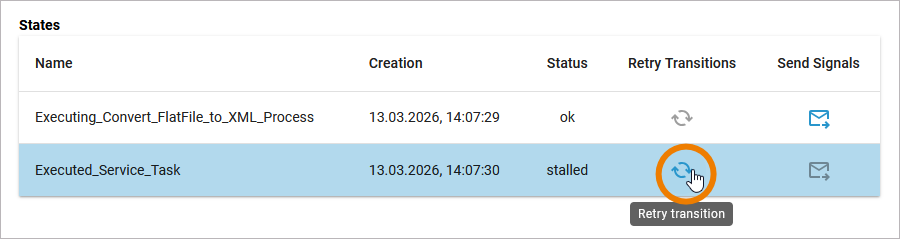
Refer to Inspecting Persistent State Object Details > Sending Signals... for details.