
Sending signals can be useful
-
during development, if you want to test a persistent state service.
-
when the service is running in production, to release a persistent state object that got stalled in a state.
Sending a Signal to All Objects in a Specific State
You can send a signal to all persistent state objects in the same state with option Send signal on top of the table. This option is available as long as no objects have been selected in the table:
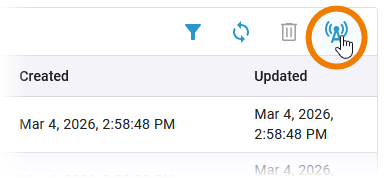
Option Send Signal to all objects is not available if your service uses a Runtime version older than 2026.2 or a Compiler version older than 8.12.0.
In the Send Signal window, your have the following options:
(1) State: Select the state in which the objects you want to send a signal to are currently located.
(2) Signal: Select the signal you want to send to all objects in the selected state.
(3) Signal Data: There are signals for which parameters must be specified. If the signal you want to send requires parameters, you can enter them here. The entry must be valid JSON and must met the defined signal parameter structure.
Example for signal with parameters:
|
Signal Structure |
Signal Data JSON |
|---|---|
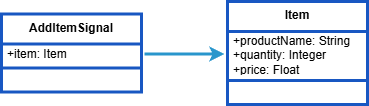
|
|
(4) Copy OpenAPI Definition: Use this option to copy OpenAPI definition to the clipboard. The OpenAPI definition helps you to understand the structure of the payload for the signal.
(5) Send: Click here to send your selected signal.
(6) Cancel: Click here to abort the action.
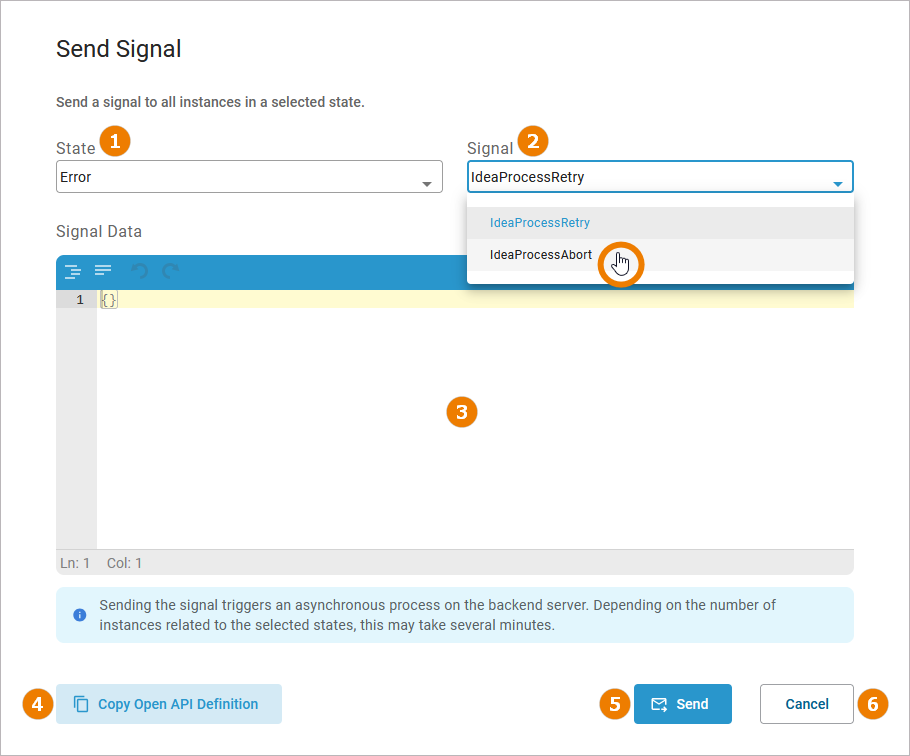
Sending the signal triggers an asynchronous process on the backend server. Depending on the number of instances related to the selected states, this may take several minutes.
Sending a Signal to a Single Object
On the details page of a persistent state object, you can send a signal to that single object.
In the States section, you can find two options to send signals:
-
Retry Transitions: Use Retry to resend the last signal to the persistent state object, if that last transition has failed.
-
Send Signal: Use Send Signal to send a specific signal to this persistent state object.
In the Send Signal window, your have the following options:
(1) State: Select the state in which the objects you want to send a signal to are currently located.
(2) Signal: Select the signal you want to send to all objects in the selected state.
(3) Signal Data: There are signals for which parameters must be specified. If the signal you want to send requires parameters, you can enter them here. The entry must be valid JSON and must met the defined signal parameter structure.
Example for signal with parameters:
|
Signal Structure |
Signal Data JSON |
|---|---|
|
|
|
(4) Copy OpenAPI Definition: Use this option to copy OpenAPI definition to the clipboard. The OpenAPI definition helps you to understand the structure of the payload for the signal.
(5) Send: Click here to send your selected signal.
(6) Cancel: Click here to abort the action.
Sending the signal triggers an asynchronous process on the backend server. This may take a few seconds.