
A virtual API Key is the key that an agent uses to call large language models (LLMs) through the Agent Gateway. It belongs to one LLM provider of its platform and permits the models that you allow. The Agent Gateway calls the LLM provider with the provider API Key. The agent never gets the provider API Key, and the LLM provider does not know the virtual API Key. The Control Hub names a virtual API Key Virtual Key.
The agents to which a virtual API Key is assigned are the agents of the virtual API Key. You assign a virtual API Key and a model to an agent on the agent details page, refer to Working With the Agent Details. Refer to Providers for details on LLM providers.
A virtual API Key starts with pasvk_. PAS services do not write it to their logs.
The Virtual Keys View
To open the list of virtual API Keys, click Virtual Keys in the Governance group of the sidebar. Each row of the table is one virtual API Key of one platform.
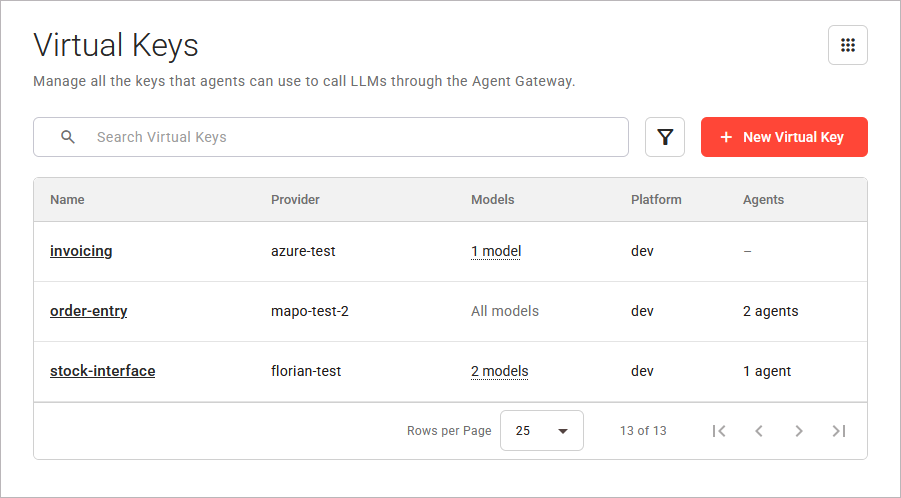
The view consists of the following parts:
|
Part |
Description |
|---|---|
|
Search |
Narrows the list to the virtual API Keys whose name, LLM provider, model names, or platform contain your search term. Refer to Working With the Control Hub for details on searching, filtering, and sorting. |
|
Filters |
Two filters are available:
You can select more than one value per filter. A virtual API Key must match each filter that has a selection. |
|
+ New Virtual Key |
Opens the New Virtual Key page. Refer to Creating a Virtual Key for details. |
|
Virtual Keys Table |
Lists the virtual API Keys. Without a sort, the table sorts them by platform, then by name. Refer to The Virtual Keys Table below. |
|
Pagination Controls |
Split the list into pages of 10, 25, 50, or 100 rows. The default is 25 rows. |
The pagination controls below the table split the list into pages. They appear when at least one entry in the content table exists. Refer to Working With the Control Hub for details.
The view remembers your search, filters, sort, and page.
The Virtual Keys Table
The table shows the following columns:
|
Column |
Description |
|---|---|
|
Name |
The name of the virtual API Key. Click the name to open the Virtual Key Details page. Refer to Managing a Virtual Key for details. |
|
Provider |
The name of the LLM provider the virtual API Key belongs to. |
|
Models |
The models that the virtual API Key permits. Click 1 model or <count> models to open a panel that lists the models. Refer to Model Permissions of a Virtual Key on page Creating a Virtual Key for details. |
|
Platform |
The platform of the virtual API Key. |
|
Agents |
The number of agents that use the virtual API Key, for example 3 agents. The column shows none if no agent uses it, and a dash (–) if the number is not known. |
You can sort the columns Name, Provider, Platform, and Agents.
The view shows different messages when no virtual API Key or no LLM provider exists, when your search matches no virtual API Key, and when the virtual API Keys cannot be read. Refer to Error Handling Agent Gateway for details.
Required Permissions
Each action needs a permission (scope) on the platform of the virtual API Key. An action that is unavailable because you do not have its permission shows You do not have the necessary permissions for this action. when you point at it.
|
Action |
Scope |
Without the Scope |
|---|---|---|
|
See the virtual API Keys and their agents |
|
The virtual API Keys of the platform are not shown. |
|
Create a virtual API Key |
|
The platform is not offered. Without the scope on any platform, + New Virtual Key is unavailable. |
|
Change the allowed models |
|
The field Allowed Models is locked. Discard Changes and Save Changes are unavailable. |
|
Revoke a virtual API Key |
|
Revoke Virtual Key is unavailable. |
|
See the LLM providers |
|
The LLM providers of the platform are not offered. |
|
Add an LLM provider |
|
The link New provider is unavailable. |
|
See the project and status of the agents |
Read access to the platform, as for the Agents view |
The project and the status of each agent show a dash (–). |
Refer to Agent Gateway for the permission that opens the Agent Gateway pages.