The Scheer PAS Agent Hub is an agentic orchestration platform to develop, deploy, run and govern AI agents, workflows and business applications.
-
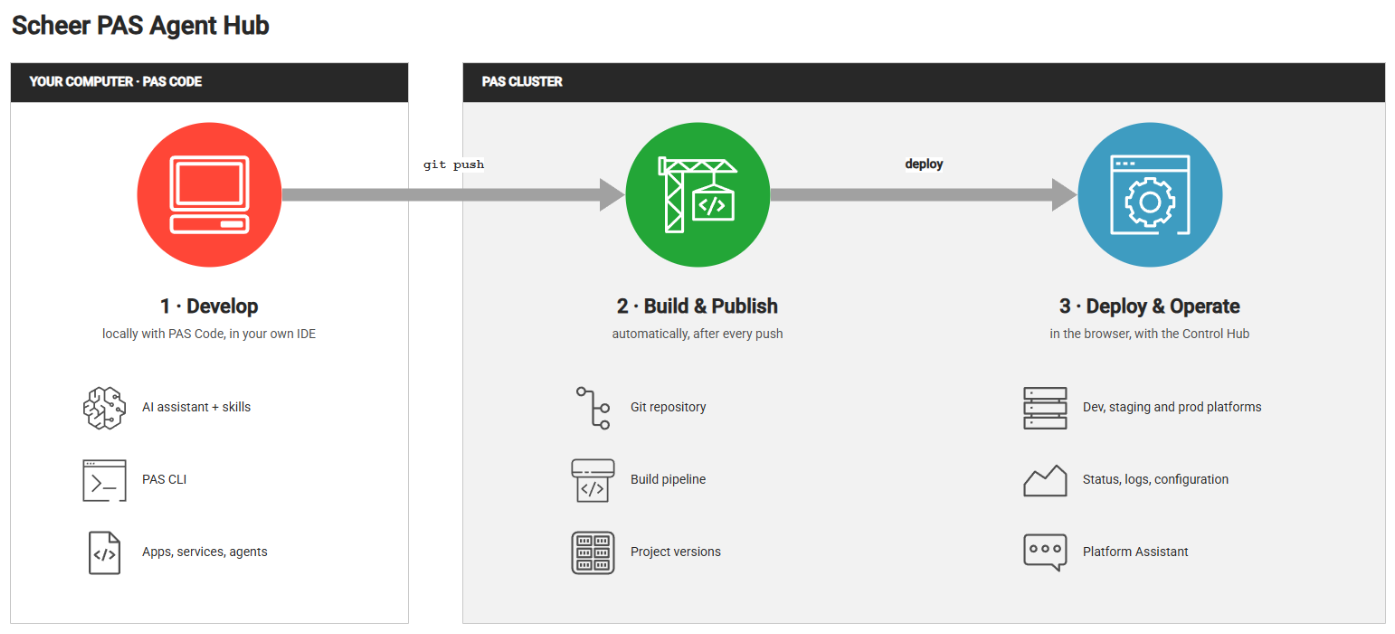
You develop locally, in your own editor, with familiar standard technologies: TypeScript, Angular, and Nest.js.
-
The development environment PAS Code is designed to work with AI coding assistants. Every project comes with the skills and rules your assistant needs to work by the platform’s conventions.
-
You push your development to the PAS cluster, and the platform builds, publishes, deploys, and runs the software.
This page gives a short overview of the Agent Hub. Follow the links for more details.
The Idea of the Agent Hub
A business application needs a technical base before the first function can operate. This base includes the project structure, the frameworks, the build scripts, the containers, the pipelines, the configuration, and the monitoring. The Agent Hub supplies this base for you.
The Agent Hub integrates scaffolding, development, testing, deployment, and operation into one consistent workflow:
-
Local development
You develop locally, in your own editor, with standard technologies such as TypeScript, Angular, and Nest.js using the PAS Code development framework. -
AI support
PAS Code is made for development with an AI coding assistant that supports you, following the PAS conventions and rules of the platform. -
Deployment and operation on the platform
After you push the software, the platform builds and versions your project, deploys it to a platform, and keeps it running.
You decide what the application should do. PAS Code makes sure that the application fits with the platform.
The Building Blocks
The Agent Hub consists of two parts. Each part owns one stage of the path from source code to running software:
|
Part |
Location |
Function |
|
PAS Code |
Your IDE |
The local development framework, consisting of the PAS CLI and a set of development skills and libraries.
|
|
Scheer PAS Cluster and Control Hub |
Browser |
Build, publish, deploy, operate, and monitor your projects. Manage the large language models (LLMs) that your agents can use through the Agent Gateway. Refer to What Is the Control Hub? for more information. |
What You Can Build
A PAS Code project is a versioned, deployable unit that is built, published, and deployed as a whole. It consists of one or more components:
|
Component |
Description |
Command |
|
App |
A web frontend (Angular) that users open in the browser. |
|
|
Service |
A backend component (Nest.js) that provides functions and data to apps and to other services. |
|
|
Agent |
An AI agent that answers questions and performs tasks on the platform. An agent is a feature of a service and is deployed together with it. It calls LLMs through the Agent Gateway of the platform. |
|
|
Bundle |
A group of components that are deployed together. |
|
Refer to Key Concepts for the definitions of these and of other terms.
Overview of the Workflow
Every project follows the same cycle:
|
Step |
Action |
Command or tool |
|
|
Connect your computer to a deployment platform of your Agent Hub. |
|
|
|
Create a project. |
|
|
|
|
AI coding assistant
|
|
|
Run and test the project on your computer. |
|
|
|
Commit and push your changes. The pipeline builds and publishes a new version. |
|
|
|
Deploy the version to an environment and operate it. |
To get a first impression, you do not even need a platform: steps to
work entirely on your computer.
Next Steps
|
Step |
More Information |
|---|---|
|
Install the PAS CLI and create your first project locally. |
|
|
Walk through the complete workflow, from the platform connection to your first deployment. |
|
|
Learn how to work with your assistant through the phases of spec-driven development. |
|
|
Deploy and operate your projects on the platform. |