
In business processes, not every user should have ongoing access to every process step and its data. To manage which user groups are allowed to access the respective process steps, you can use lanes and roles in BPMN modeling. Multiple roles with different permissions can be assigned to each lane. These permissions are applied to all BPMN elements located in that lane.
We distinguish three types of permissions:
|
Write |
Read |
List |
|---|---|---|
|
|
|
For more information on assigning roles and using lanes, refer to Modeling Roles.
The Idea_Management_Example illustrates how such a separation of permissions might look:
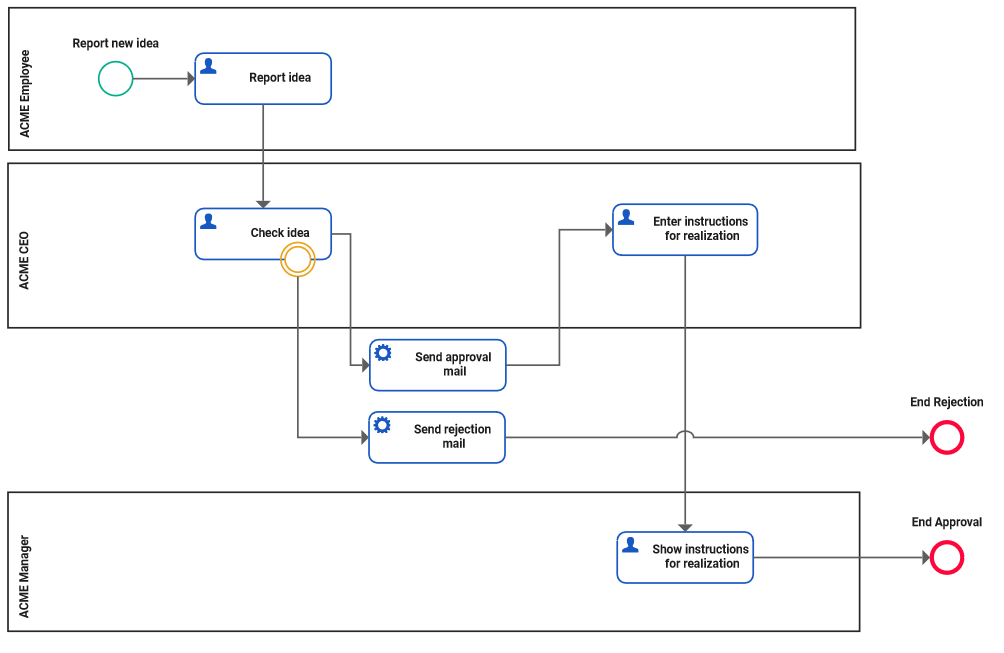
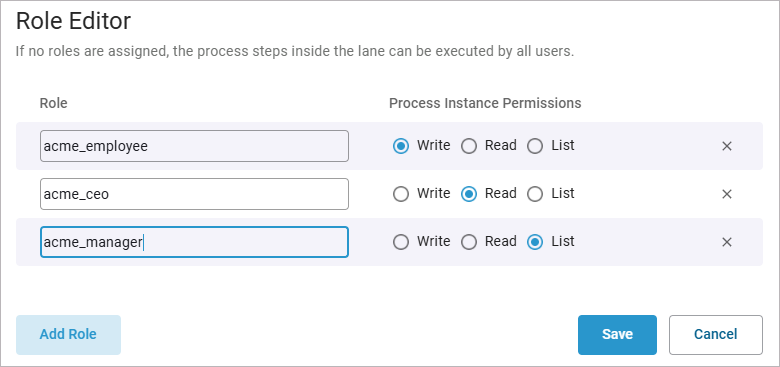
Idea_Management_Example
Click here to download a simple example model that shows what you can do with Lanes and Forms in Scheer PAS Designer. It also contains a configured instance list and shows the usage of trigger events.
To restrict which user groups are allowed to create new process instances, place the start events in lanes and assign the appropriate permissions to these lanes.
For more information, refer to Permissions for Start Events.
If you want to control which user groups can view and edit form data or press buttons, place the related user tasks in lanes and assign the appropriate permissions. In this context, you can work with the three permission types (write, read, list) in even greater detail than with the start event.
For more information on restricting user tasks, refer to Permissions for User Tasks.
Related Content
Related Pages: