
If you are dealing with e.g. row objects, which represent SQL table contents, it is tedious to create INSERT statements, detect differences in two versions of the same row object, and create UPDATE statements for it. Especially for tables with many columns, the resulting Action Script is not really maintainable. This library provides means to
-
compare to row objects and see if they differ, and where
-
automatically create
INSERT,UPDATE,SELECT WHEREandCOUNT WHEREstatements
For this to work, the library accepts JSON representations of the row objects, so basically operates on Strings. Using the zjsonpatch Java library, which is an implementation of RFC 6902 JSON Patch, introspection, then becomes possible.
JsonSQL offers methods to create INSERT, UPDATE, SELECT, and COUNT statements based on JSON representations of row objects, and a JsonSQLConfig instance capturing required meta information. Support database types are SQLServer and MySQL only.
Operation signatures

JsonSQLConfig Attributes
|
Name |
Type |
Mandatory |
Description |
Allowed Values / Example |
|
|---|---|---|---|---|---|
|
tableName |
String |
|
The name of the table to put into the SQL statements. |
MyTable |
|
|
dbType |
String |
|
One of the valid database type (same as used in the SQL Adapter). |
SQLServer |
Use an SQL Server database (default). |
|
MySQL |
Use a MySQL database. |
||||
|
whereColumns |
Array of String |
|
An array of strings containing the names of columns to be used in the |
|
|
|
columnTypes |
Array of String |
|
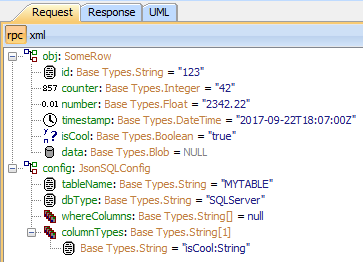
An optional array of strings defining the names and types of specific columns. The library uses JSON type information and pattern matching to derive the column types
However, you may want to store a DateTime value into a String type column, or the guessing and pattern matching may fail to work. In these cases you can provide the correct type information for such columns.
|
|
|
JsonSQL Methods
|
Method |
Description |
|---|---|
|
createInsert(json, config) |
Creates an INSERT statement based on an object's JSON representation and a config. keyColumns in the configuration are ignored. |
|
createUpdateFromVersions(oldVersion, newVersion, config) |
Creates an UPDATE statement based on the row currently stored in the DB (oldVersion) and the row after some changes have been made (newVersion). |
|
createUpdateFromDiff(oldVersion, diff, config) |
Creates an UPDATE statement based on the row currently stored in the DB (oldVersion) and the JSON diff to the row after some changes have been applied. |
createUpdateFromVersions(oldVersion, newVersion, config) == createUpdateFromDiff(oldVersion, jsonDiff(oldVersion, newVersion), config)
Examples
Please find some examples below. The generated SQL statements are terminated with a ;.
JsonDiff:calcDiff
|
Input |
Library call |
Output |
|---|---|---|
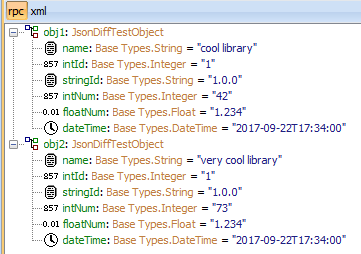
|

|

|
JsonSQL:createUpdateFromVersions
|
Input |
Library call |
Output |
|---|---|---|
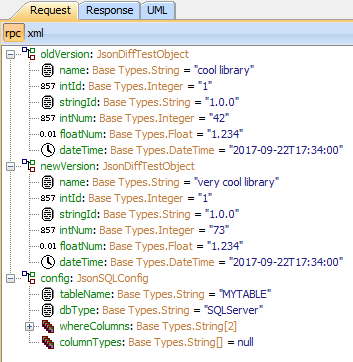
|

|

|
JsonSQL:createUpdateFromDiff
|
Input |
Library call |
Output |
|---|---|---|
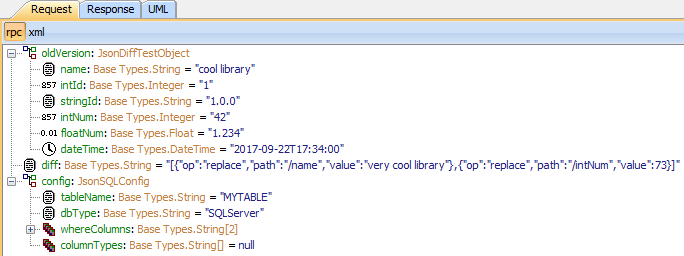
|
|

|
JsonSQL:createInsert
|
Input |
Library call |
Output |
|---|---|---|
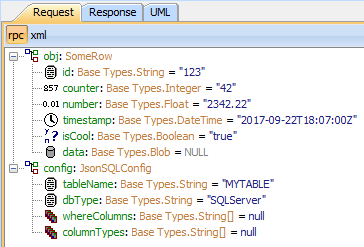
|

|

|
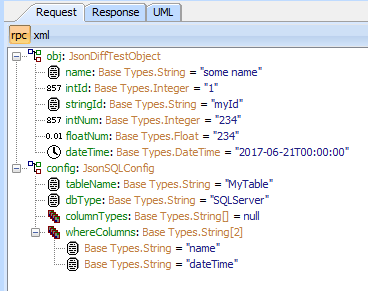
JsonSQL:createCount
|
Input |
Library call |
Output |
|---|---|---|
|
|

|
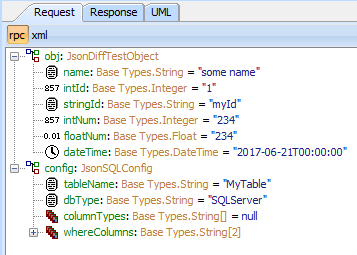
JsonSQL:createSelect
|
Input |
Library call |
Output |
|---|---|---|
|
|

|
JsonSQL with custom column type
(compare input/output with line above)
|
Input |
Library call |
Output |
|---|---|---|
|
|

|
Related Content
Related Pages:
-
JsonDiff
Calculate JSON patch from two JSONdocuments, or apply a patch to a document. -
JsonMatch
Testing JSON strings or object instances for matching against a condition expressed in a DSL (Domain Specific Language) similar toWHEREclauses in SQL. -
JsonNode
Parse and manipulate arbitrary JSON strings, without the need to create a class representation for it. -
JsonPath
Find and extract parts of JSON object based on JsonPath queries. -
JsonPointer
Extract part of JSON object using a JsonPointer (such as returned as part of a patch from JsonDiff). -
Json Schema
Convert a JSON schema file to an XSD, ready to be imported into the PAS Builder.
Related Documentation: