
Overview
This package is primarily useful when you access REST endpoints that expect multipart form data as input (like most APIs do where you need to upload files). In these cases, you model this endpoint as expecting Blob and construct the binary data by "hand", e.g. in Action Script. MultipartFormDataBuilder is intended to make this easy and reliable.
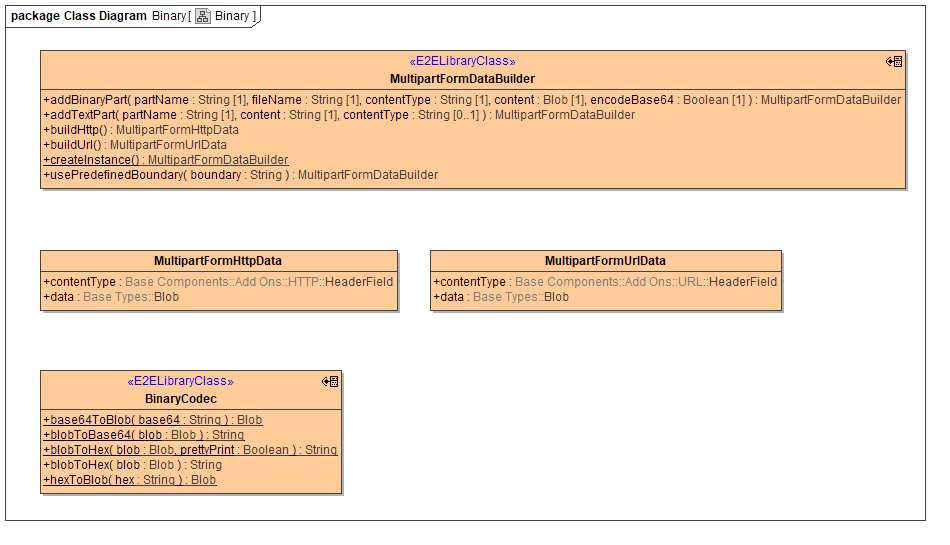
The BinaryCodec class offers operations that are also availabe in xUML base classes String and Blob, with the one exception of blobToHex() with pretty print, which prints blob data like this:
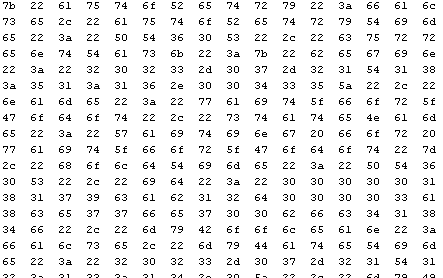
i.e. in 16 pairs of two in each row.
MultipartFormDataBuilder
See below for a simplified example of multipart form data. Note that the boundary is used to separate the multiple parts, and that it is also part of the content-type header. The form data contains three parts, the first being a text part and the following two being binary (or file) parts. Note that binary parts feature their own content-type "header".
Example Multipart Form Data
POST / HTTP/1.1
Content-Type: multipart/form-data; boundary=---------------------------9051914041544843365972754266
Content-Length: 554

-----------------------------9051914041544843365972754266
Content-Disposition: form-data; name="text"

text default
-----------------------------9051914041544843365972754266
Content-Disposition: form-data; name="file1"; filename="a.txt"
Content-Type: text/plain

Content of a.txt.

-----------------------------9051914041544843365972754266
Content-Disposition: form-data; name="file2"; filename="a.html"
Content-Type: text/html

<!DOCTYPE html><title>Content of a.html.</title>

-----------------------------9051914041544843365972754266--
In order to build this using MultipartFormDataBuilder, you would write an Action Script like this, which is fed
-
an instance of MultipartFormDataBuilder as "builder"
-
content of file1 as file1Content
-
content of file2 as file2Content
and will produce a "result" of type MultipartFormHttpData:
Sample Action Script
builder.usePredefinedBoundary('---------------------------9051914041544843365972754266'); // this is optional, if you don't provide a boundary, builder will create a unique boundary for you.
builder.addTextPart("text", "text default", cast(NULL));  // cast(NULL) is required to keep the compiler happy
builder.addBinaryPart("file1", "a.txt", "text/plain", file1Content);
builder.addBinaryPart("file2", "a.html", "text/html", file2Content);
set result = builder.buildHttp();
The two different result classes MultipartFormHttpData and MultipartFormUrlData differ only in the type of the contentType header field. Depending on whether you work in PAS Builder or PAS Designer you have to pick the one matching the additionalHeaders array type of the REST adapter call.