
You are working in the Control Hub and have questions about a project, component, deployment, or log? Ask our Platform Assistant for help! You can find the assistant on top right:
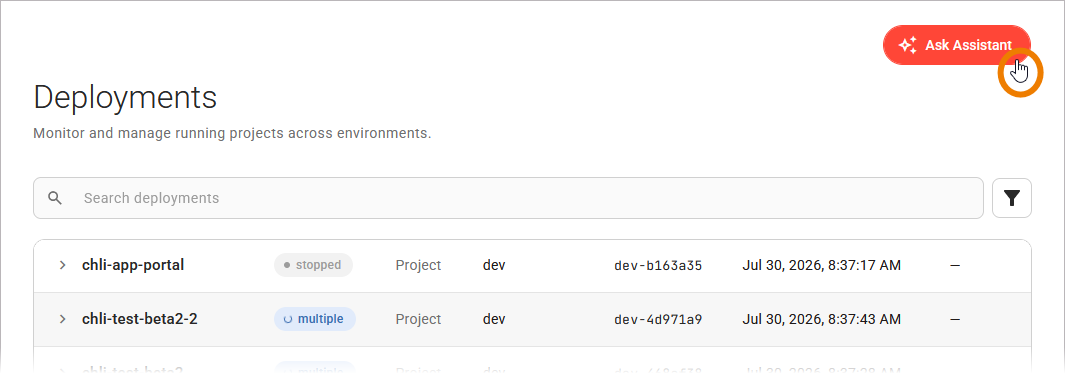
The Platform Assistant answers questions about your projects, components, and logs based on the current state of your deployments. The assistant is read-only: it reports information but never starts, stops, deploys, or deletes anything, and it respects your permissions, so it can only report what you are allowed to see.
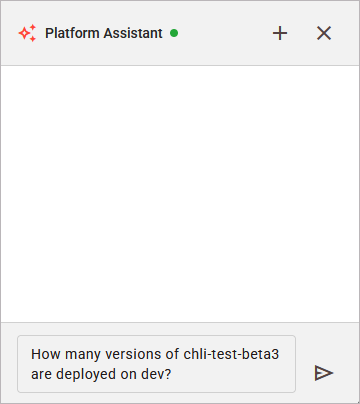
Click Ask Assistant to open the chat window and enter your question to start a conversation:
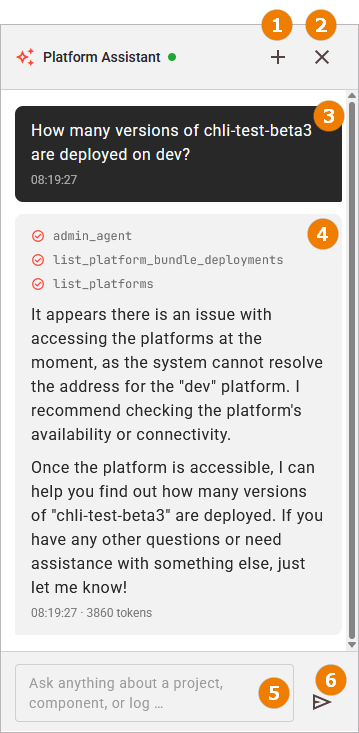
The assistant shows you the following:
|
|
The option to start a new conversation. Starting a new conversation does the following:
A cleared conversation cannot be restored. Copy the content you want to keep out of the message feed before you start a new conversation. |
|---|---|
|
|
The option to close the chat window. Closing the panel does not end the conversation: When you open the assistant again, your messages are still there. |
|
|
Your question (read-only). |
|
|
The assistant’s answer (read-only). |
|
|
Use this field to enter any question about a project, component, deployment, or log. Use Shift+Enter to add a line break instead of sending the question. |
|
|
The option to send your question. As an alternative, you can also press Enter. |
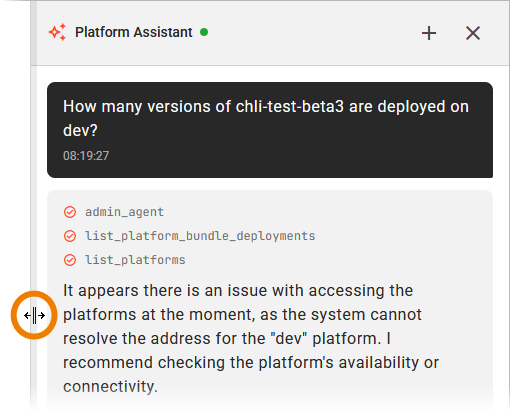
You can adapt the panel size to your needs:
-
Drag the left border of the panel to change its width.
-
Double-click the left border to reset the panel to its default width.
The Control Hub remembers the width of the panel for your next visit.
Asking Questions
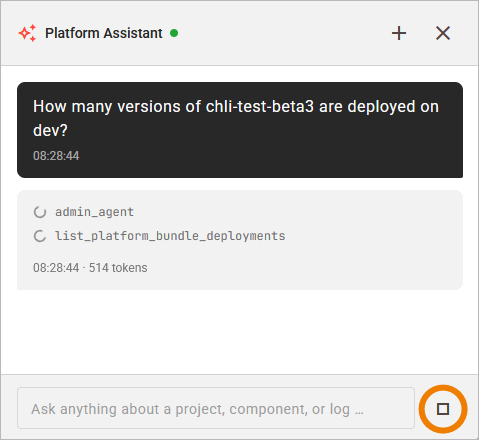
The assistant answers one question at a time. While a reply is being generated, the input field is locked and the send button becomes a stop button:
You can ask the assistant about the things the Control Hub manages, for example:
-
Which projects are deployed on a platform, and what their status is.
-
Which components a deployment has, and whether one of them has a problem.
-
What the logs of a component report, for example recent errors.
-
Which versions of a project the catalog holds.
The assistant remembers the messages of the current conversation, so you can build on what you already asked. After a question such as "Which projects run on my dev platform?", a follow-up such as "Which of them are stopped?" is answered in the same context.
The following applies to a conversation:
-
The assistant answers one question at a time. A new question is possible when the current reply is finished or stopped.
-
Closing the assistant panel keeps the conversation. When you open the panel again, your messages are still there.
-
Reloading the Control Hub in your browser starts an empty conversation.
The assistant answers questions about the platform. It does not perform actions. To start, stop, restart, delete, deploy, or configure something, use the Control Hub itself (refer to Deploying a Project and Managing Deployments for further information.
Reading the Reply
The reply is written into the message feed while the assistant produces it, so you can read it as it grows. A reply passes through the following states:
|
State |
Description |
|---|---|
|
Thinking |
The assistant has received your question and has not produced any output yet. |
|
Steps |
The assistant consults the platform for the information it needs. Each step is listed with its name, and gets a check mark when it is finished. |
|
Answer |
The text of the reply, written into the feed as it is produced. Lists, tables, and code in the reply are formatted. |
|
Finished |
The reply is complete. The time and the number of tokens used are displayed below it. |
The steps tell you where the information comes from. The assistant queries the deployment data of the platform, the cluster, and the logs, depending on your question. A reply can contain several steps, and a question that spans more than one topic produces one step per topic.
The feed follows the reply as it grows. If you scroll up to read an earlier message, the feed stops following, so that the text you are reading stays in place. Scroll back to the end of the feed, or send the next question, to follow the reply again.
If the assistant cannot answer, the reply is displayed as an error message: The assistant is currently unable to respond. Please try again later. Send your question again. If a reply fails after it has already produced text, the produced part stays in the feed. Refer to Error Handling Platform Assistant for the error messages and how to resolve them.
Stopping a Reply
While the assistant writes a reply, the send button next to the input field becomes a stop button. Use this button to end the reply immediately:
The text the assistant has produced so far stays in the message feed as the reply, the steps are marked as finished, and the input field is unlocked so that you can ask the next question.
Stopping a reply affects only the reply. The conversation continues, and the assistant still remembers the messages before it.