
States and Life Cycle
Technically, creating a persistent state (in short: PState) object means to create entries in generic database tables. In this context, the term generic means that the database tables do not depend on the object's class, because any persistent state class will be mapped to the same tables.
These tables hold information about the state of the object and all object data. After creation of a PState object, only the object's state machine diagram defines its life cycle. The state machine diagram defines all states a process instance can be in - including the initial and the final state. While in a state, the process instance can receive asynchronous messages via signals. Changes of state are called transitions.
For each BPMN process that has been modeled with the Designer, the compiled xUML service contains one standard root state machine diagram that supports error handling and compensation as well as history states. Refer to xUML Service State Machines for an overview of all states of the root state machine.
Only events defined in the state machine diagram can change object states and object data. Events in this context are:
-
completion event: triggered by an automatic state transition
-
signal event: triggered by a signal reception
-
time event: triggered by a time trigger
For example, signals sent to the object transport data that can be added to the object. It is not possible to retrieve the object from the database, manipulate it, and write it back. However, you can retrieve a read-only copy of the persisted object. This means after having created a PState object, the object lives on the database until it reaches its final state. Again, the object's state machine diagram defines which events may trigger the transition into its final state. If the object reached its final state, it will be deleted.
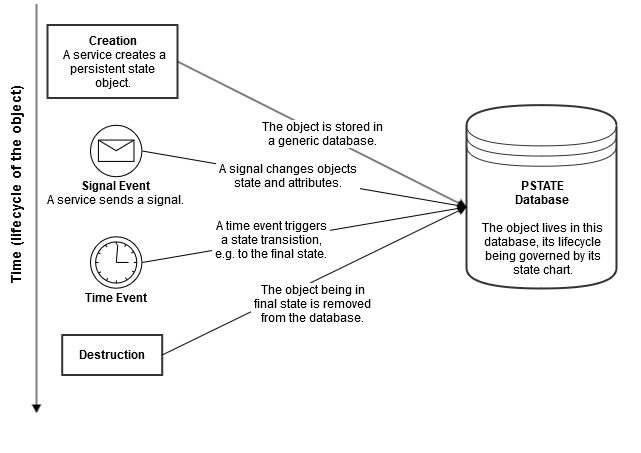
State charts describe the life cycle of objects completely. This means the modeler is relieved of explicitly managing the destruction of PState objects.
Data Storage
The safest way to store persistent data, current states, and pending events is a database. In general, this is an internal RDBMS (Relational Database Management System) that is provided with Scheer PAS (MariaDB). But it is also possible to use a database that is external to the PAS platform, e.g. in form of a managed database in Azure.
We highly recommend not to change the automatically generated database configuration.
However, there are three other options besides an external RDBMS that may be useful, e.g. for testing purposes:
|
|
RDBMS |
Memory |
Local File |
Volatile |
|---|---|---|---|---|
|
Operation |
The database dependency has to be drawn in the deployment diagram and an empty database schema / instance needs to be set up by the administrator. Enables the modeler to use any relational database being supported by the xUML Runtime. |
Content of the state database is written to a local file upon shutdown and read from the same file when the service is started again. |
Content of the state database is written to a local file upon shutdown and read from the same file when the service is started again. |
Similar to memory, but does not backup / restore PState data to a file upon shutdown and restart. |
|
Performance |
2-3 times slower than local files. |
5-15 times faster than other options. All PState data is held in RAM, which results in increased memory consumption. |
5 times slower than memory. |
5-15 times faster than other options. All PState data is hold in RAM, which results in increased memory consumption. |
|
Data Persistence |
|
Docker: Kubernetes: |
Docker: Kubernetes: |
|
|
Risks |
Most secure option. Backup / restore procedures and scaling mechanisms are delegated to the database management. |
Docker: will restart the old container and therefore pick-up the state from the last clean shutdown / save. Kubernetes: will flag the old pod as Unknown or Error in case of a node restart and most probably create a new pod upon restart. Therefore the ephemeral file, meaning all PStates, will be lost. |
Unless the file system is corrupted, no data is lost upon power failure or server crash. But in case of a container restart, the data is lost. |
Clear dataset on every service start, independent of the prior shutdown reason. |
|
Use Case |
PState data needs to be persisted reliably (production default). |
PState persistence is not critical, but nice to have. |
PState should be persisted, but is not critical. Speed matters more. |
Complete stateless service, only speed matters. Retry is handled externally. |
|
Remarks |
Additionally any service that accesses the same state database can send signals to the same objects. This includes services that implement load-balancing behavior sharing the same objects. |
Memory and local file share the same SQLite format, so you can switch between them without losing data. In both cases, the generated file pstate.db is an SQLite database file. |
|
|
It is not necessary to adapt database schemas when changing the structure of the persisted data because the database tables are generic. This makes the database model flexible and robust.
Expert Advice
-
Refer to Persistent State Data Storage for details about the database that the persistent state engine uses to store PState objects.
-
You can configure the PState settings for each xUML service in the service configuration. For details on the configuration options, refer to Configuring the Persistent State Database.
Signals
Sending signals means that a signal message is queued in a table of the state database. Asynchronously, the xUML Runtime tries to deliver signals to its target object. The number of delivery retrials is limited and can be defined by the modeler. If the system does not succeed in delivering the signal after the given number of retries or the object is destroyed before delivery, the xUML Runtime calls the integrated error handler for the signal. Afterwards the undelivered signal is automatically removed from the queue and database.
In order to avoid concurrency issues, signal delivering and handling does comply with the following rules:
|
Rule |
Description |
|---|---|
|
Signals are never lost. |
Every signal will be delivered to the object or external entity, to which it is directed, or after expiration will be handled by the error handler. |
|
A signal is "used up" when it is accepted by an object. |
The xUML Runtime removes the signal from the signal queue. This implies that signals cannot be consumed multiple times. |
|
Signals are asynchronous. |
This means that signals are not delivered "immediately" but some time after a signal is generated. In practice, this is most probably instantly, but may be delayed by concurrency, shutdown, or other events. |
|
Signals are being queued. |
Multiple signals can be outstanding for a given PState object. |
|
New signals are processed only after completion of the previous signal (Run-To-Completion). |
When the transition of a PState object is completed, it is in the new state. Only if transition has been completed, the object can accept a new available signal if any such exists. This is called Run-To-Completion. |
|
Sending order is preserved in one object context. |
If a single object generates multiple signals to a receiving instance, the signals will be received in the order generated. |
|
Sending order is not preserved over different object contexts. |
If there are signals outstanding for a particular persistent state object that were generated by different senders, it is indeterminate, which signal will be accepted first. The signals are accepted in the order they are received in the queue, which may differ from the order they have been generated. |
For detailed information on how to send a signal to one or more PState objects, refer to one of the following pages, depending on your setup:
Footnotes
Differences between Docker and Kubernetes
Customers can run Scheer PAS on a Docker or a Kubernetes setup.
If the behavior of Kubernetes and Docker differs, we highlight the text in different colors to clarify the differences:
-
Kubernetes-related text is highlighted in green.
-
Docker-related text is highlighted in blue.