
There are use cases where you might want to parse a flat file into an XML document for further processing. The example below shows such an implementation.
FlatFileAdapter_ConvertToXML_Example
Click here to download a simple example model that shows how to use the Flat File adapter to parse a flat file into an XML document in Scheer PAS Designer.
The xUML Runtime can serialize any data out of the box if the classToXML() operation is applied on a data structure. A standard serialization of the flat file described on Flat File Parsing (with sample data) would look like the following:
<?xml version="1.0" encoding="UTF-8"?>
<ProductList>
	<header headerLine="line;category;name;number;price;serviceInterval;type"/>
	<products category="Adapter"
	          line="1"
	          name="AF-1200"
	          number="00001"
	          price="64.5"
	          serviceInterval="52"
	          type="micro"/>
	<products category="Adapter"
	          line="2"
	          name="AF-1300"
	          number="00002"
	          price="67.5"
	          serviceInterval="52"
	          type="micro"/>
</ProductList>
Target XML
The target XML of our example, however, differs from the standard serialization.
-
The XML document should have a dedicated root name and root namespace.
-
The XML document should have dedicated element names and a separate namespace for the products.
-
The line property of the flat file is not needed.
-
Only the name property of the flat file should be an XML attribute (default serialization).
-
All other properties should be rendered as XML elements without namespace.
<?xml version="1.0" encoding="UTF-8"?>
<example:ProductList xmlns:example="http://scheer-pas.com/designer/example"
                     xmlns:product="http://scheer-pas.com/designer/example/product">
	<product:products name="AF-1200">
		<category>Adapter</category>
		<number>00001</number>
		<price>64.5</price>
		<serviceInterval>52</serviceInterval>
		<type>micro</type>
	</product:products>
	<product:products name="AF-1300">
		<category>Adapter</category>
		<number>00002</number>
		<price>67.5</price>
		<serviceInterval>52</serviceInterval>
		<type>micro</type>
	</product:products>
</example:ProductList>
Defining the Structure of the XML Document
The XML document the flat file will be generated to is defined as follows:
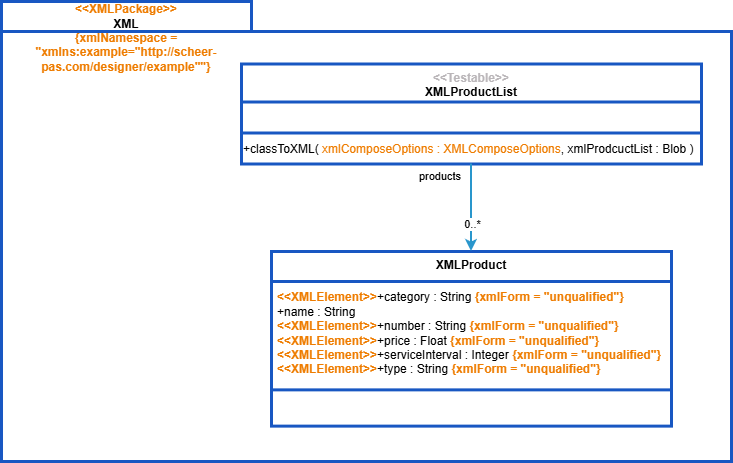
XML Root Element: example
Root Namespace
|
Line |
XML Content |
|---|---|
|
2 |
|
You can set the root name (ProductList), root prefix (example) and root namespace (http://scheer-pas.com/designer/example) by setting XMLComposeOptions on the classToXML() operation that is used to serialize the XML document structure:
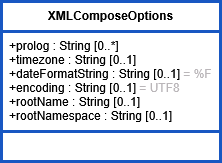
classToXML() receives an options parameter that can be used to set the root name, prefix and namespace of the XML document. In the example, this is done in operation setXmlComposeOptions():
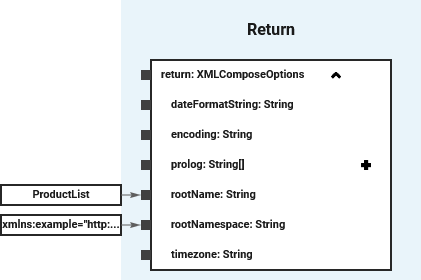
Refer to XML Serialization for more details on the serialization process, classToXML() and the compose options.
Additional XML Element Namespace
|
Line |
XML Content |
|---|---|
|
3 |
|
Also, in our example, a divergent namespace for XML elements is defined in the root element.
You can set a needed XML namespace for the XML elements by applying the XML Package extension on the package the XML structure resides in (XML in our example). Configure the namespace (http://scheer-pas.com/designer/example/product), including prefix (xmlns:product) in attribute XML Namespace.
The namespace will then be generated to the root element and the prefix applied to all elements.
XML Elements: products
|
Line |
XML Content |
|---|---|
|
4 |
|
The products from the product list will be generated to dedicated XML elements without additional configuration. The prefix that has been defined via the XML namespace on the XML package (product) will be applied to all of them.
XML Attribute: name
|
Line |
XML Content |
|---|---|
|
4 |
|
Class properties will be generated to XML attribute per default - no need to configure something for the name property in our example.
To generate to XML elements, apply extension XML Element (see below).
XML Elements: category, price, serviceInterval, type
|
Line |
XML Content |
|---|---|
|
5-9 |
|
Set the extension XML Element on all properties in the XML document structure you want to serialize as XML elements.
In our example, these XML Elements should have no namespace and prefix applied. You can achieve this by setting the Form attribute of the extension to unqualified. In this case, the default namespace will be applied.
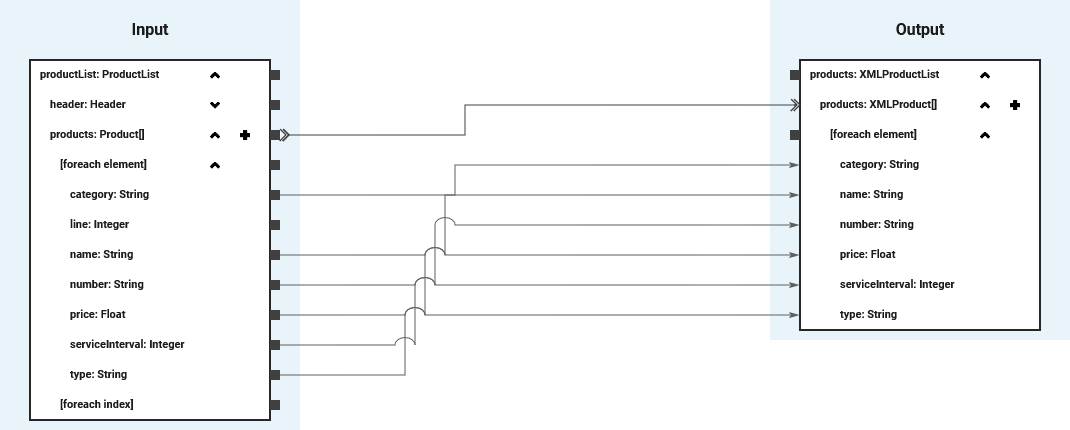
Map the Data
In a mapping diagram, you can map the parsed flat file data in to the XML document structure. In the example, this is done in operation convertFlatFileProductsToXMLProducts().
Related Content
Related Pages:
Related Documentation: