
Scheer PAS is the platform for agentic enterprise transformation. It brings together workflows, data, APIs, and AI agents to operationalize process automation across complex organizations through architected, governed, and autonomous environments.
You may be wondering: “What sets Scheer PAS apart from other solutions?”
It is the process-oriented approach that is designed to make complex processes more efficient, achieves optimized automation, and better business outcomes.
Our Model2Execute Approach
Scheer PAS supports developers from initial process and execution modeling to server deployment, administration and process/error analysis.
-
Both, the pure business processes and their execution (including data models, integrations, APIs and UIs), are created in the Designer. Developers are continuously supported by a validation process running in the background. Once the modeling is complete, developers can easily compile the business process into an xUML service, deploy it to the server and run it.
-
The automatically created service APIs can be secured, published, and made accessible to specific groups of people via API Management.
-
The services and the platform can be managed via the administration components, and various options for process and error analysis are available.
In short: Scheer PAS allows you to develop, execute, and manage integration workflows in a process-driven way. It embeds the integration of applications, services, and data into a process view to achieve an optimal business outcome when automating complex business processes.
Scheer PAS Components
The Scheer PAS platform consists of several core and supplementary components. Depending on the user rights managed in the user and identity management, users access the components released for them directly from the Scheer PAS Portal.
The core components include the Designer, API Management and Process Mining. These components are supplemented by other useful tools such as container and user administration, the Analyzer and Log Analyzer for troubleshooting and debugging, and others. While working with Scheer PAS, all these components interact seamlessly with each other:
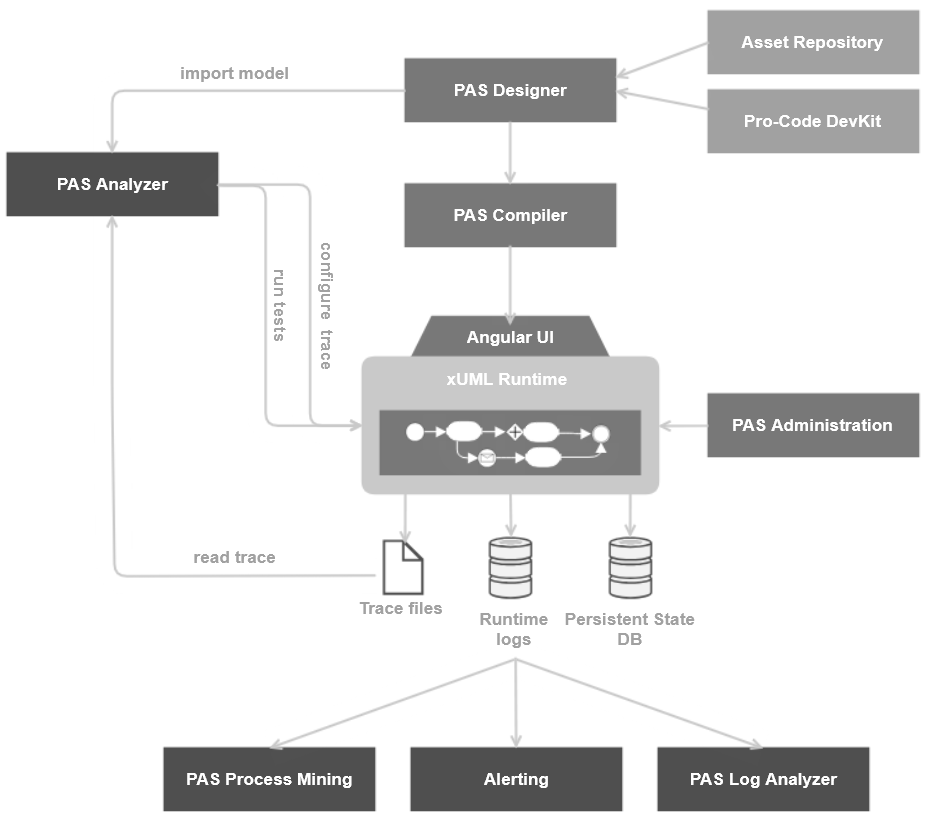
To help you understand how all these components work together, we will explain this overall concept of Scheer PAS in more detail.
Designer
The Designer is at the heart of working with Scheer PAS. You can use this modeling tool for both UI-based and purely integration-focused application development. A simplified version of the BPMN standard is used for asynchronous process modeling, while the UML standard is used for synchronous execution modeling.
In addition to processes and execution diagrams, you can also create data structures and forms for UI-based process steps in the Designer. If Low-Code modeling options are no longer sufficient, the service can be extended using the Pro-Code approach. Various adapters and connectors for integrating third-party systems are available for integration processes.
During the modeling process, continuous validation and compilation run in the background of the Designer to identify potential problems and update the integrated test environment.
Refer to our Designer Guide for an extensive documentation on this PAS component.
API Management
All service APIs are created during deployment. They can then be tested using a test interface, which is accessible via Designer or through the service details in the PAS Administration. However, the service APIs are initially only available internally within the platform. To make your APIs available externally, for example to your partners, you can use API Management. You can easily import your service APIs from the PAS Administration to API Management, that is situated between the API and the client and enables you to apply different policies, enforcing them as runtime rules for each managed API request made.
API Management also allows to control visibility, security, and versioning of APIs. In addition, API management supports versioning of plans and clients, ensuring that changes to these elements are tracked and maintained without affecting the original configuration. With the API Developer Portal, you can grant customer developers access to your APIs. It also gives you full control over access to your APIs: Determine for yourself who can use your APIs - only members of a specific organization, the users of API Management or all (anonymous) visitors to the developer portal.
Refer to our API Management Guide for an extensive documentation on this PAS component.
Administration Tools
After deployment, developers and administrators can manage the xUML services in the PAS Administration. The application allows operation and management of deployed xUML services and, with special user permission, PAS platform services, including container statuses, endpoints, logs, service configuration, and persistent state objects. Service administration includes a deployment wizard for direct deployment without the Designer.
In the User Management, administrators can create and deactivate users and manage their permissions, roles and profiles. The user management is also connected with the Identity Management, which is based on Keycloak. This open source identity and access management solution allows to implement various authorization concepts, such as SSO or connections to third-party systems.
Refer to our Administration Guide for an extensive documentation on all administrative PAS components.
Analysis Tools
Various tools support platform users with analyzing their services, identifying faulty implementations or using process data for the further development and optimization of services:
-
Log Analyzer: Service logs displayed in the Log Analyzer (based on OpenSearch) can provide initial indications of the causes of errors. Access to the log files can be very helpful for troubleshooting. If a problem occurs with an xUML service, each incident is recorded in chronological order. Various search parameters can also be defined.
Refer to Analyzing Logs for an extensive documentation on this PAS component. -
Analyzer: The Analyzer is a helpful tool for tracking exactly where an error occurred in a service. You can import services into the Analyzer, and establish a connection to the PAS platform. The Analyzer then supports developers with runtime analysis, troubleshooting of distributed systems and regression testing. The Analyzer consists of three tools to help with the above: a Trace Analyzer, a Log Analyzer, and a Regression Test Tool.
Refer to our Analyzer Guide for an extensive documentation on this PAS component. -
Process Mining: Process Mining allows you to analyze tracing information stored in the service context on the PAS server by graphically displaying the processes performed. This makes it possible to discover and monitor processes, recognize bottlenecks and generally identify inefficiencies and areas for improvement.
Refer to our Process Mining Guide for an extensive documentation on this PAS component. -
xUML Service Monitor: Allows developers to define events that trigger alerts for specific user groups when errors occur.
Refer to Monitoring xUML Services for an extensive documentation on this PAS component.
Some Real-Life Examples
-
Complete Process Acceleration
A large pharmaceutical and healthcare distribution and logistics specialist faced huge challenges lacking any connections between customers and suppliers. Isolated legacy solutions could not meet the modern enterprise problems with an adequate solution.
Scheer PAS established a central data hub through SAP and EDI communication and implemented standardized interfaces for SAP-RFC, EDIFACT, X12, XML, flat files, FTP, SMTP, AS400/SDS, multibyte and other - which led to a huge acceleration of the company’s processes. -
Unified and Integrated IT Systems
A British private bank experienced operational inefficiencies and increased costs due to a non-integrated system landscape and frequent process disruptions. Moreover, poor integration with third-party systems, like payment processors, led to delays and potential revenue losses.
Scheer PAS established the development of a central, highly available and load-safe integration platform that can also be used to integrate third-party systems. This also enabled the integration and automation of debit and card processors as well as the integration of software for recognizing speech patterns. -
Reduced operating costs and ensured flexibility through process digitization
A customer from the manufacturing industry was confronted with the problem that outdated SAP systems were hindering the company's ability to innovate and progress, as the overview of customers and products was not guaranteed.
Scheer PAS created a single data hub for all sales processes, the core components of which are hosted in the customer's hybrid cloud. The new data hub allows the customer to use his existing SAP system and enables standardized trading for B2B and B2C. -
e-Invoicing
Due to changes in legal regulations, electronic invoicing has been mandatory for most business transactions since January 2025. A customer from the advertising industry was unable to retrieve data from the internal ERP system and had to create the visual representation of the invoices, as well as the validation and dispatch manually.
With Scheer PAS, an automatic export of invoice data from the internal ERP system was realized. The data is then converted to XRechnung, validated and automatically sent to the customer.
If you are curious about further details on already implemented use cases, we recommend to read our customer use cases (sorted by industry): Manufacturing, Retail, Banking and Finance, and Pharma.
Related Content
Related Pages:
Related Documentation: