
To split flat file record fields, you can also use regex patterns.
You need deeper knowledge of regex patterns to use this approach.
Look at the example flat file below. It contains a list of URLs.
https://scheer-acme.com/home
https://scheer-acme.com/products
https://scheer-acme.com/pas/cust/service/ProductExport/ui/Product_export/00000019eec5983900004a6eb08a4700b3daa078/Show_export_file
By specifying an Attribute Pattern on the flat file record, you can split the records e.g. into
-
protocol
-
delimiter
-
host
-
port
-
path
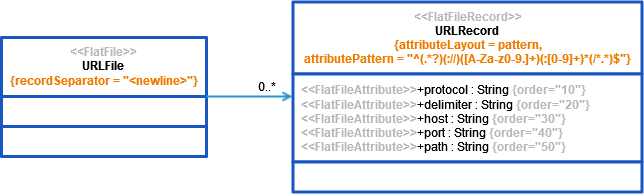
The pattern to split the record with is:
^(.*?)(://)([A-Za-z0-9.]+)(:[0-9]+)*(/*.*)$
Each group delimited with brackets represents an record field (property of the flat file record class).
Other Common Flat File Issues:
-
Flat File With Header Lines -
Handling Empty Lines When Composing a Flat File -
Handling of White Spaces When Parsing Flat Files With Fixed Length -
Handling Quotes When Composing a Flat File -
Mapping of Hierarchical Record Structures -
Parsing Flat File Records Without Data -
Using Patterns to Separate Attributes