
An instance of Connection is the first parameter of all MailClient operations. On first encounter in a call, the library will initiate the connection and retain it, i.e. successive calls using the same connection settings will re-use the already opened connection to the mail server, where "same" is identified by host+user+protocol+port+security. So changes to any of these attributes will be considered being a "new" connection, while changes on any other attributes have no effect.
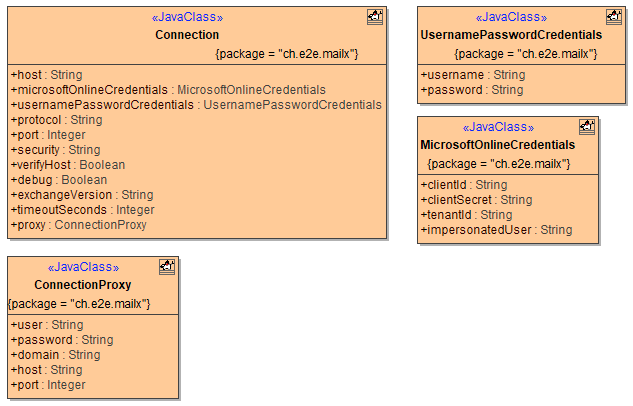
Attributes keystore and keystorePassword that you may miss if you are migrating from version 1, have been removed from the Connection object. Loading the keystore is now a global operation on the Crypto class, see Keys and Certificates.
Connection
Class Connection has the following attributes:
| Attribute Name | Type | Description | Allowed Values | |
|---|---|---|---|---|
| debug | Boolean | Specify whether to write additional debug information to the bridgeserver log. | true | Additional debug information is written to the bridgeserver log. |
| false | No additional logs (default). | |||
| exchangeVersion | String | Specify the Microsoft Exchange version (optional). | 2007_SP1 | Exchange 2007 Service Pack 1 |
| 2010 | Exchange 2010 | |||
| 2010_SP1 | Exchange 2010 Service Pack 1 | |||
| 2010_SP2 | Exchange 2010 Service Pack 2 and higher (default) | |||
| host | String | Specify the host name/IP address of the mail server. | a valid host name or IP address |
for exchange connections this can be left NULL, triggering Autodiscover (which might fail) for office365 connections this is ignored |
| microsoftOnlineCredentials | Object | Specify OAuth login credentials for Microsoft Online connections | a valid set of credentials | either this or usernamePasswordCredentials must be set |
| port | Integer | Specify the port of the mail server (optional) | a valid port number | If omitted (NULL), the standard port for the chosen protocol and security is used. |
| protocol | String |
Specify the protocol used for e-mail retrieval and storage.
|
imap | Use the IMAP protocol. |
| imaps | Use IMAP over SSL. | |||
| pop3 | Use POP3. | |||
| smtp | Use the SMTP protocol. | |||
| smtps | Use the SMTPS protocol. | |||
| exchange | Use Exchange Web Service (EWS) API with a hosted Exchange Server | |||
| office365 | Use Exchange Web Service (EWS) API with a Office 365 Server (will ignore host). | |||
| security | String |
Specify the encryption.
|
none | No encryption used.
exchange and office365 protocol (see attribute protocol) use SSL in any case, this cannot be overridden. |
| ssl |
Use SSL encryption. |
|||
| starttls |
Use TLS encryption.
|
|||
| timeoutSeconds | Integer | Specify the number of seconds after which a request (send or receive) times out. |
any positive integer Default is 0, which translates to the following defaults:
|
|
| usernamePasswordCredentials | Object | Specify the user's credentials | a valid set of credentials | either this or microsoftOnlineCredentials must be set |
| verifyHost | Boolean | Specify whether for SSL connections the mail server host shall be verified or not (optional). | true | Verify the mail server's SSL certificate (default, see also security). |
| false | Do not verify the mail server. | |||
| Username and Password Credentials
|
||||
| usernamePasswordCredentials.username
|
String | Specify the user account on the mail server. | a valid user name
|
Some SMTP servers allow unauthorized sending, in these cases you may leave it as NULL. |
| usernamePasswordCredentials.password
|
String | Specify the user's password. | a valid password
|
Some SMTP servers allow unauthorized sending, in these cases you may leave it as NULL. |
| Microsoft Online Credentials (only applicable to office365 protocol)
|
||||
| microsoftOnlineCredentials.clientId
|
String | client id of your app registration |
Make sure to follow the path for "app-only authentication" |
|
| microsoftOnlineCredentials.clientSecret
|
String | client secret of your app registration | ||
| microsoftOnlineCredentials.tenantId
|
String | tenant id of your microsoft online organization | ||
| microsoftOnlineCredentials.impersonatedUser
|
String | name (email address) of the mailbox you want to impersonate | a valid email address
|
Provide the email address of the mailbox you want to interact with (e.g. read messages from) |
|
Proxy Settings (only applicable to HTTP based connections, i.e. exchange or office365 protocol) |
||||
| proxy.host | String | Specify the host name/IP address of the proxy server. | a valid host name or IP address | |
| proxy.port | Integer | Specify the port of the proxy server. | a valid port number | |
| proxy.domain | String | Specify the user domain on the proxy server (optional). Some Windows-based proxy servers might require this for authentication. | a valid ActiveDirectory domain name | |
| proxy.user | String | Specify the user account on the proxy server (optional). | a valid user | |
| proxy.password | String | Specify the user's password (optional). | a valid password | |