
Using the MailClient you can list folders, check their presence, as well as create and delete them:
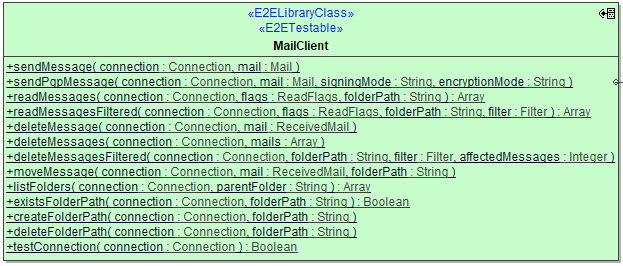
Operations expecting a folderPath argument will treat this the following way:
| Folder Path | Description | Example |
|---|---|---|
| NULL |
This is interpreted as meaning the |
|
path beginning with / |
This is interpreted as a path from the mail connections root folder. | /Archive/Orders |
path not beginning with / |
This is interpreted as a relative path to the |
Archive/Orders |
The intention of this behavior is to abstract away the fact that <Inbox> has many different names depending on the connection, i.e. IMAP typically uses INBOX, Exchange calls it Inbox, and a German Exchange calls it Posteingang.
Also note that POP3 does not support folders other than <Inbox>. Hence when you specify a POP3 connection, folderPath parameters other than NULL will raise an exception.
Operations
listFolders
| Parameter | Types | Direction | Description | Allowed Values / Example | |
|---|---|---|---|---|---|
| connection | (25.2) JavaMail Library Reference#Connection | in | Specify the Connection object defining the mail server connection parameters to use (see Mail Server Connection). |
|
|
| parentFolder |
String |
in | Specify the path to the parent folder. See note regarding folder handling. | NULL | List folders below <Inbox>. |
| \ | List folders below root folder. | ||||
| a path | List folders below given path. | ||||
| folders | Array of String | return |
Returns a recursive list of sub-folder paths. |
|
|
existsFolderPath
| Parameter | Types | Direction | Description | Allowed Values / Example | |
|---|---|---|---|---|---|
| connection | (25.2) JavaMail Library Reference#Connection | in | Specify the Connection object defining the mail server connection parameters to use (see Mail Server Connection). |
|
|
| folderPath |
String |
in | Specify the path to the folder to check. See note regarding folder handling. | orders/outgoing |
|
| exists | Boolean | return |
Returns if the given folder is existent on the mail server. |
true | Folder exists. |
| false | Folder does not exist. | ||||
createFolderPath
| Parameter | Types | Direction | Description | Allowed Values / Example | |
|---|---|---|---|---|---|
| connection | (25.2) JavaMail Library Reference#Connection | in | Specify the Connection object defining the mail server connection parameters to use (see Mail Server Connection). |
|
|
| folderPath |
String |
in | Specify the path to the folder to be created. See note regarding folder handling. | orders/outgoing |
|
deleteFolderPath
| Parameter | Types | Direction | Description | Allowed Values / Example | |
|---|---|---|---|---|---|
| connection | (25.2) JavaMail Library Reference#Connection | in | Specify the Connection object defining the mail server connection parameters to use (see Mail Server Connection). |
|
|
| folderPath |
String |
in | Specify the path to the folder to be deleted recursively. See note regarding folder handling. |
|
|