
To help you with your problem, our support team needs some information on your software and environment. The information required depends on the particular PAS component for which you need help.
Please note, that the quality of your report plays a significant role in reducing time that we need to fix the problem.
Required General Information
Regardless of the affected component of the Scheer PAS platform, we kindly ask you to always provide us with the following basic information for each support request:
Sample data is displayed in gray.
|
Item |
Information |
Example |
|---|---|---|
|
Version
|
Which version of Scheer PAS do you have installed? You can see the version you are using in the lower right corner of the Scheer PAS Portal. |
|
|
The Scheer PAS version also clearly defines the version for the individual components. If you want to know more about which version of a component is included in a specific Scheer PAS version see Scheer PAS Release Notes. |
If you are using Scheer PAS version 21.2.1, Scheer PAS Designer version 3.2.0 is associated with it. |
|
|
System |
On which system did the error occur? If you are not sure, just send us the URL from the address line of your browser. |
|
|
Network
|
|
|
|
User |
Which user was affected by the problem and when? Please send us the respective user name and the time when the error occurred. |
|
|
Browser |
In which browser did the problems occur? If possible, send us also the browser version. |
|
|
Operating System
|
Which operating system do you use on your client device? |
|
|
Available Memory
|
What is the available memory of your operating system? |
|
|
Component
|
In which component and in which version did you observe the error? |
|
|
Problem Description
|
|
|
|
The problem / error occurs
|
|
|
System Files
|
If connections with certain services are known, please attach all relevant log files or Kibana exports to your support request. |
|
Required Administration-specific Information
|
Item |
Information |
Example |
|---|---|---|
|
View |
Does the problem occur in a specific view of the application?
|
|
Required Designer-specific Information
|
Item |
Information |
Example
|
|---|---|---|
|
View
|
Does the problem occur in a specific view of the application? |
|
|
Namespace
|
In which namespace does the error occur? |
|
|
Libraries |
Which libraries do you use in your Designer project and in which version? |
|
|
Deployment
|
Where do you want to deploy to? We recommend using container deployment as the default deployment target starting with PAS 23.1. For further information see: |
|
|
Support Data
|
If you need to open a support request related to problems with a Designer service, you should always attach the so-called Support Data. You can export the data via the Controls panel in the Designer: 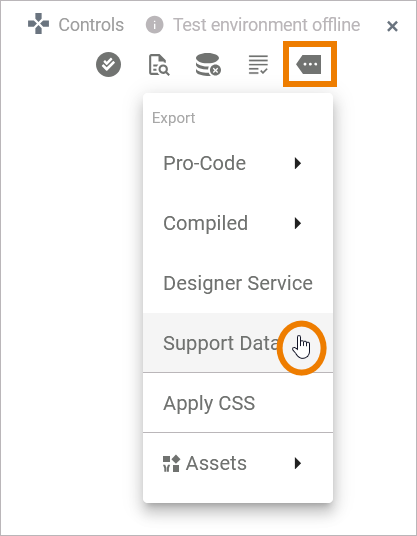
|
|
Required Analyzer-specific Information
If you have got problems with the Analyzer, find below a list of information we need to work on your request.
|
Item |
Information |
|---|---|
|
Analyzer version |
You can easily find the version number by going to the Help > About menu. There you can copy the whole version information by clicking Copy to Clipboard. |
|
Builder project |
If possible, zip the Builder project folder and send us the whole project this way or send us all involved repositories and all required resources. |
Installation Problems
|
Item |
Information |
|---|---|
|
Problem with Analyzer Installation |
If you have got a problem with installing the Scheer PAS Analyzer, please provide us with
|
Required Process Mining-specific Information
|
Item |
Information |
Example
|
|---|---|---|
|
Database
|
Which database is used? |
|
If the problem is related to the collection of the data, please include the following information:
|
Item |
Information |
|---|---|
|
analytics-collector-service |
Send the logs of this service. |
|
analytics-etl-service |
Send the logs of this service. |
|
ETL Process |
Status of the ETL process/the imports (you can check in the logs of the analytics-etl-service). |
|
Service |
|
Related Content
Related Pages: