
|
Menu |
Toolbar Icon |
Menu Item |
Hotkey |
Description |
|
|---|---|---|---|---|---|
|

|
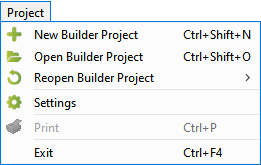
New Builder Project |
Ctrl+Shift+N |
Opens the dialog window to create a new Builder project. |
|

|
Open Builder Project |
Ctrl+Shift+O |
Opens a file chooser dialog to select an existing Builder project. |
||

|
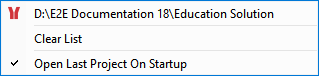
Reopen Builder Project |
|
Shows a list of recently opened Builder projects to select from (for details see below). |
||

|
Settings |
|
Opens the settings dialog of the current Builder project. |
||

|
|
Ctrl+P |
|
||
|
|
Exit |
Ctrl+F4 |
|
||
|
|
|
|
Reopen Builder Project |
|
|
|

|
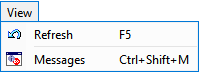
Refresh |
F5 |
Refreshes the screen. |
|

|
Messages |
Ctr+Shift+M |
Shows the messages window at the bottom of the Analyzer window. |
||
|
|
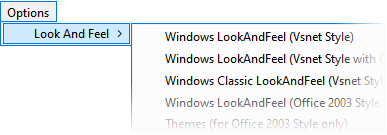
Look and Feel |
|
Choose between several different program designs. This documentation uses the Windows LookAndFeel (Vsnet Style). |
|
|

|
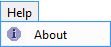
About |
|
Shows version and release date of the Analyzer and its modules. |
|
The Import menu differs between the tools, that are part of the Analyzer.
-
Refer to Importing the Service Description (Builder) to get a description of the Import menu of the Trace Analyzer.
-
The Regression Test Tool has no import menu at all.